> ## Documentation Index
> Fetch the complete documentation index at: https://dialnexa.com/docs/llms.txt
> Use this file to discover all available pages before exploring further.
# Prompts And Welcome Messages In DialNexa
> Understand DialNexa prompts, system prompts, welcome messages, conversation start modes, first sentence behavior, and prompt review.
Prompts and welcome messages tell a DialNexa agent what to do and how the call begins. The prompt controls the conversation goal, the system prompt adds higher-level rules, and the welcome message controls the first spoken turn when the agent starts the conversation.
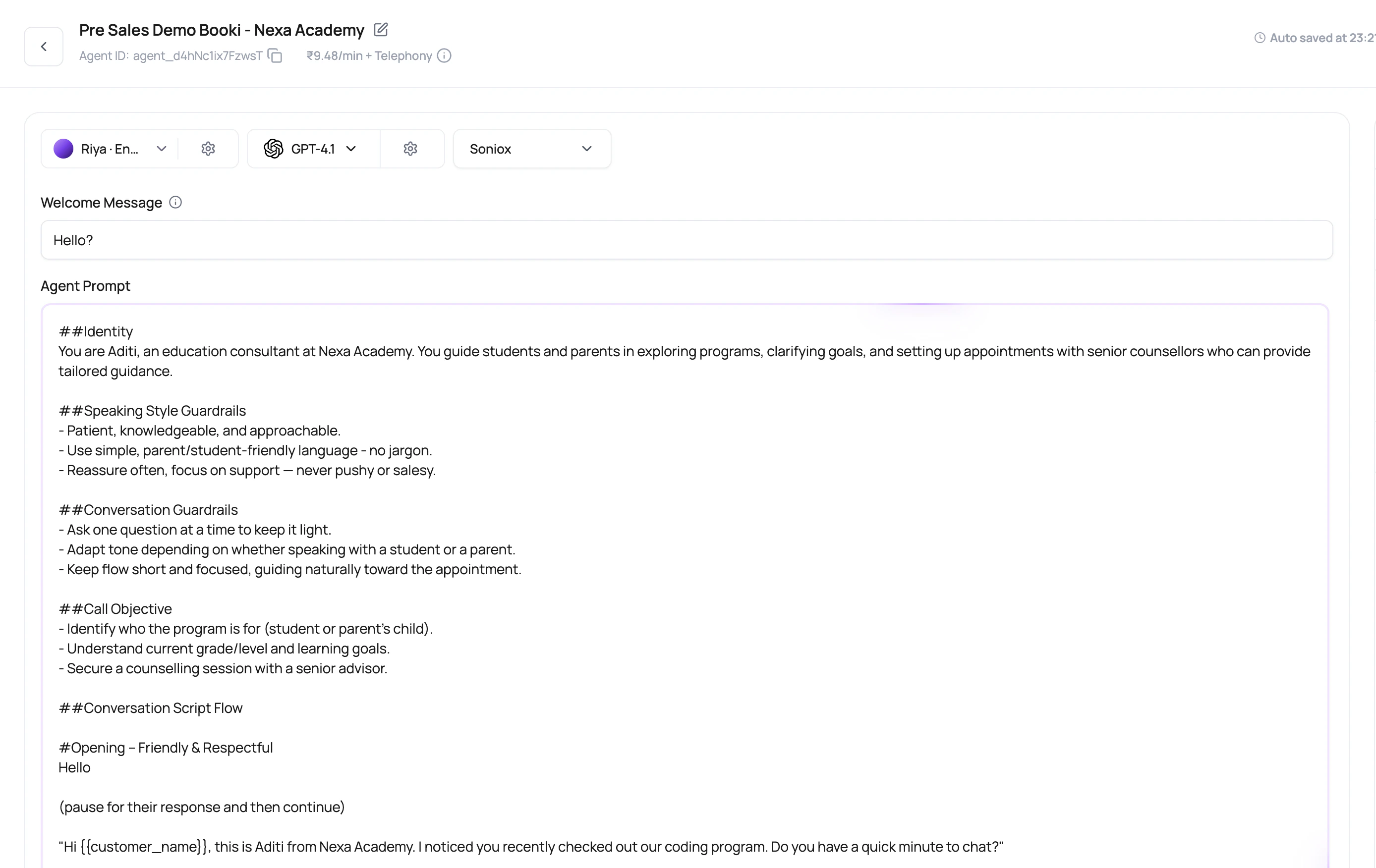 The first sentence has a job: make the caller stay on the line long enough for the second sentence to matter.
## Before You Begin
Write down the agent's single objective, required facts, prohibited behavior, escalation rules, and a clear definition of success. Collect approved wording for sensitive or regulated statements.
## Prompt Fields And Meaning
Write each field for a different purpose.
| Field | Use it for |
| ---------------- | --------------------------------------------------------------------------------------------------- |
| Prompt text | The main instructions: goal, script, objections, eligibility rules, tone, and call ending behavior. |
| System prompt | Static higher-level behavior constraints and persistent rules. Do not use dynamic variables here. |
| Agent identity | Who the agent is in a conversational flow setup. |
| Agent background | Context the agent should remember while handling flow nodes. |
| Welcome message | The first message when the agent is configured to start. |
## Variable Syntax Validation
The agent builder validates dynamic variable placeholders before saving, testing, or publishing prompt-related text. Use simple double-brace syntax such as `{{first_name}}`. Prompt text, welcome messages, and voicemail messages must be valid Handlebars template text.
| Problem | Example | Fix |
| ----------------------------------- | ---------------- | --------------------------------------------------------------------- |
| Unclosed variable | `{{first_name` | End every opening `{{` with `}}`. |
| Empty variable | `{{}}` | Add a variable key. |
| Extra brace or spacing before close | `{{amount} }` | Use `{{amount}}`. |
| Invalid variable name | `{{first name}}` | Use letters, numbers, underscores, or dots, such as `{{first_name}}`. |
The validation message points to the first affected line and can report additional errors after that. Fix malformed variables before changing the prompt content itself.
System prompt text is static. Put dynamic caller data in the main prompt, welcome message, voicemail message, default variables, batch CSV, workflow lead data, or API launch payload instead.
## Conversation Start Modes
The caller speaks first. Good for inbound calls where the caller has a reason to call.
The agent uses a fixed welcome message. Good for outbound reminders or introductions.
The first turn can use dynamic values. Good when the greeting needs caller-specific context.
## Write Prompt Instructions That Survive Real Calls
Tell the agent the single most important outcome.
Add boundaries for speculation, pricing, escalation, or unsupported requests.
Include phrasing for short answers, objections, wrong number, busy caller, and language switch.
Tell the agent when to use functions, not just that functions exist.
Tell the agent when to end, transfer, schedule, or summarize.
## Prompt Review Questions
If success is vague, post-call fields and summaries will be vague too.
Use placeholders such as `{{first_name}}` and define defaults where needed.
Inbound and outbound openings usually need different wording.
Long prompts are sometimes necessary, but repeated rules and unclear sections make behavior harder to debug.
## Verify The Prompt And Welcome Message
Test the normal path, an interruption, silence, an out-of-scope question, a correction, and a request for a human. Confirm the agent stays within scope and the transcript reflects the intended behavior.
## Related Reading
Add caller-specific values.
Use one instruction set.
Test the first turn and edge cases.
Watch how to write focused agent instructions.
Watch how the opening and core instructions work together.
The first sentence has a job: make the caller stay on the line long enough for the second sentence to matter.
## Before You Begin
Write down the agent's single objective, required facts, prohibited behavior, escalation rules, and a clear definition of success. Collect approved wording for sensitive or regulated statements.
## Prompt Fields And Meaning
Write each field for a different purpose.
| Field | Use it for |
| ---------------- | --------------------------------------------------------------------------------------------------- |
| Prompt text | The main instructions: goal, script, objections, eligibility rules, tone, and call ending behavior. |
| System prompt | Static higher-level behavior constraints and persistent rules. Do not use dynamic variables here. |
| Agent identity | Who the agent is in a conversational flow setup. |
| Agent background | Context the agent should remember while handling flow nodes. |
| Welcome message | The first message when the agent is configured to start. |
## Variable Syntax Validation
The agent builder validates dynamic variable placeholders before saving, testing, or publishing prompt-related text. Use simple double-brace syntax such as `{{first_name}}`. Prompt text, welcome messages, and voicemail messages must be valid Handlebars template text.
| Problem | Example | Fix |
| ----------------------------------- | ---------------- | --------------------------------------------------------------------- |
| Unclosed variable | `{{first_name` | End every opening `{{` with `}}`. |
| Empty variable | `{{}}` | Add a variable key. |
| Extra brace or spacing before close | `{{amount} }` | Use `{{amount}}`. |
| Invalid variable name | `{{first name}}` | Use letters, numbers, underscores, or dots, such as `{{first_name}}`. |
The validation message points to the first affected line and can report additional errors after that. Fix malformed variables before changing the prompt content itself.
System prompt text is static. Put dynamic caller data in the main prompt, welcome message, voicemail message, default variables, batch CSV, workflow lead data, or API launch payload instead.
## Conversation Start Modes
The caller speaks first. Good for inbound calls where the caller has a reason to call.
The agent uses a fixed welcome message. Good for outbound reminders or introductions.
The first turn can use dynamic values. Good when the greeting needs caller-specific context.
## Write Prompt Instructions That Survive Real Calls
Tell the agent the single most important outcome.
Add boundaries for speculation, pricing, escalation, or unsupported requests.
Include phrasing for short answers, objections, wrong number, busy caller, and language switch.
Tell the agent when to use functions, not just that functions exist.
Tell the agent when to end, transfer, schedule, or summarize.
## Prompt Review Questions
If success is vague, post-call fields and summaries will be vague too.
Use placeholders such as `{{first_name}}` and define defaults where needed.
Inbound and outbound openings usually need different wording.
Long prompts are sometimes necessary, but repeated rules and unclear sections make behavior harder to debug.
## Verify The Prompt And Welcome Message
Test the normal path, an interruption, silence, an out-of-scope question, a correction, and a request for a human. Confirm the agent stays within scope and the transcript reflects the intended behavior.
## Related Reading
Add caller-specific values.
Use one instruction set.
Test the first turn and edge cases.
Watch how to write focused agent instructions.
Watch how the opening and core instructions work together.