> ## Documentation Index
> Fetch the complete documentation index at: https://dialnexa.com/docs/llms.txt
> Use this file to discover all available pages before exploring further.
# DialNexa Batch Call Retries And Statuses
> Understand DialNexa batch call statuses, campaign lifecycle, recipient call statuses, retry count, retry interval, retry expiry, and result counters.
DialNexa batch call statuses show whether a campaign is being drafted, scheduled, waiting behind another batch, actively sending calls, paused, completed, cancelled, or deleted. Recipient results inside that campaign still use call statuses such as `completed`, `did_not_pick`, `busy`, `no_answer`, `failed`, `cancelled`, and `retry_expired`.
Read campaign status and recipient call status separately. A campaign can be `running` while many recipient calls are still `created`, `initiated`, or `sent`. `active` can still appear in older filters or data, but new campaign lifecycle decisions use `waiting`, `scheduled`, and `running`. `initiated` also appears in both tables below with different meanings.

 ## Batch Lifecycle State Machine
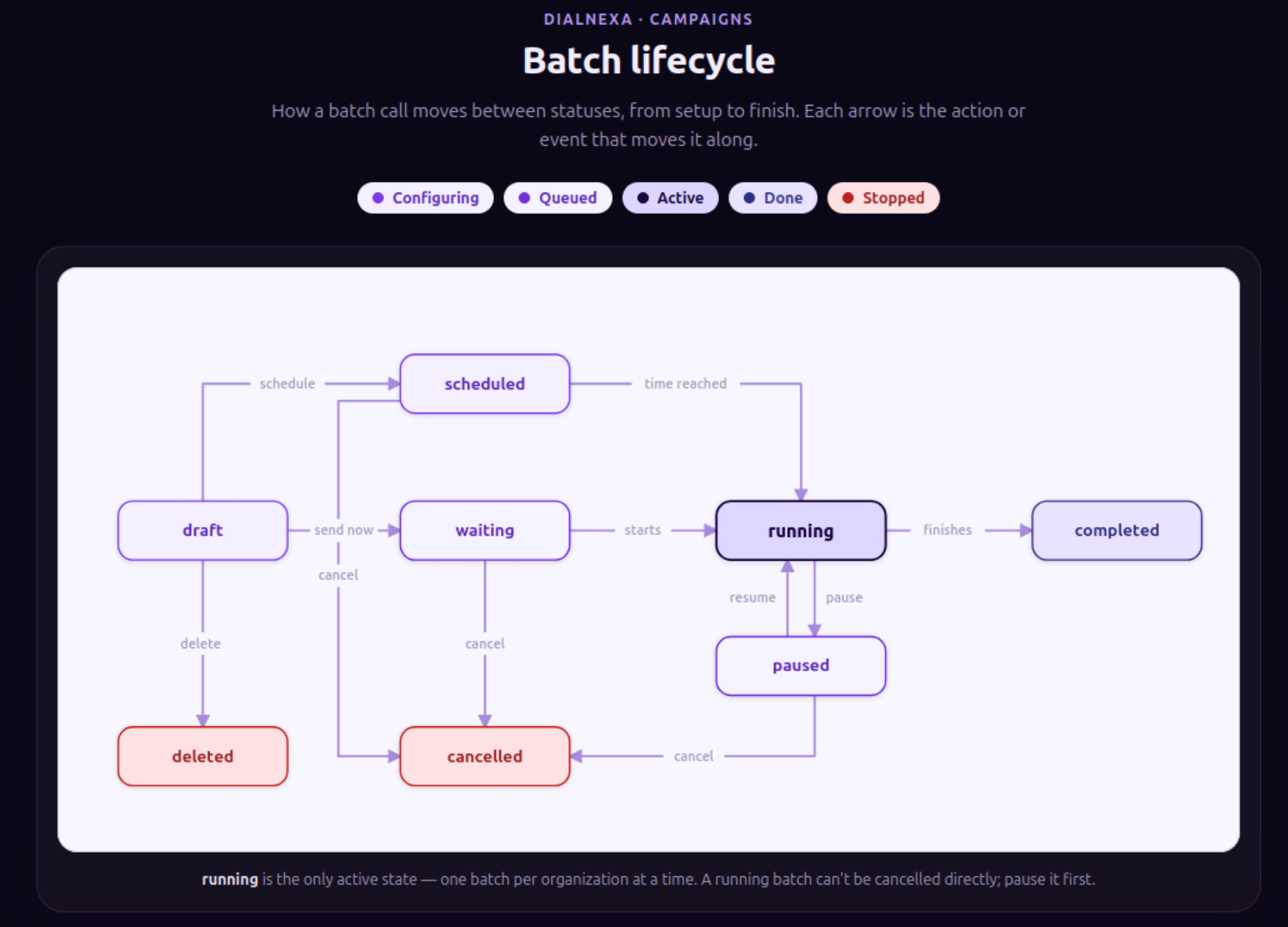
The current batch lifecycle is a state machine. `draft`, `scheduled`, and `waiting` prepare the campaign, `running` is the only active sending state, and final states such as `completed`, `cancelled`, and `deleted` stop normal batch movement. DialNexa runs one `running` batch per organization at a time. If a `running` batch must be stopped permanently, pause it first, then cancel the paused batch.
## Batch Lifecycle State Machine
The current batch lifecycle is a state machine. `draft`, `scheduled`, and `waiting` prepare the campaign, `running` is the only active sending state, and final states such as `completed`, `cancelled`, and `deleted` stop normal batch movement. DialNexa runs one `running` batch per organization at a time. If a `running` batch must be stopped permanently, pause it first, then cancel the paused batch.
 ## DialNexa Batch Call Retry And Status Values
These statuses apply to the campaign container.
| Status | Final? | What it means | What to do next |
| ----------- | ----------------------------- | ---------------------------------------------------------------------------------------------------------------------------------------------------------------------------------- | ------------------------------------------------------------------------------------------------------ |
| `draft` | No | The campaign is saved for review and is not placing calls. | Review recipients, dynamic variables, number, schedule, and retries. |
| `scheduled` | No | The campaign has a future start time and is waiting for that window. | Confirm the schedule, number, wallet, and recipient file before the start time. |
| `waiting` | No | The campaign is accepted but waiting for the organization queue, start window, or another batch ahead of it. | Let the earlier batch finish, or pause or cancel if this batch should not run next. |
| `running` | No | DialNexa is preparing, sending, or monitoring calls for the campaign. This is the only active sending state. | Watch Call History, attempts, picked-up count, and retry history. Pause before cancelling permanently. |
| `paused` | No | New call processing is stopped temporarily. Calls already initiated can still finish. Pending retry calls are parked so they do not continue dialing while the campaign is paused. | Resume when ready or cancel if the campaign should stop permanently. |
| `completed` | Yes | No pending direct calls or retry children remain for the campaign. | Export results and separate completed, failed, and did-not-pick groups. |
| `cancelled` | Yes | The campaign was stopped permanently. Queued calls and queued retry children can be marked `cancelled`. | Create a new campaign if you need to call the list again. |
| `deleted` | Yes | The campaign is no longer active in normal batch operations. | Use remaining exports or audit records if you need historical evidence. |
| `active` | Compatibility value | Older data or filters may use this ready-state label. New scheduled and queued work should appear as `scheduled` or `waiting`. | Treat it as non-final, then fetch the batch for current details. |
| `initiated` | Compatibility acknowledgement | The create response was accepted and returned a batch id. It is not the long-running campaign state. | Fetch the batch or review Call History for the current status. |
## Batch Queue Conflicts
DialNexa runs one batch campaign per organization at a time. If another batch is already `running` or `waiting`, a new batch can enter `waiting` and start when the earlier queue clears. The dashboard also warns when a scheduled batch starts within the next 30 minutes, because it may affect when the new batch can begin.
Publishing an agent can also surface batch conflicts for the selected phone number. Resolve blocking campaigns before publishing: edit `draft` batches, pause `running` batches, and cancel `waiting` or `scheduled` batches when they should not use the agent or number.
## Recipient Call Statuses
Each recipient attempt becomes a call log. These statuses are the ones you filter and export from Call History.
| Call status | Final? | Meaning in a batch campaign | Common follow-up |
| --------------- | ------ | --------------------------------------------------------------------------------- | -------------------------------------------------------------------------- |
| `created` | No | The recipient call log exists and is queued or prepared. | Wait for progress. Investigate if it stays here too long. |
| `initiated` | No | Call setup has started. | Wait for provider updates. |
| `sent` | No | The outbound request was sent to the provider. | Monitor for connection or final outcome. |
| `received` | No | DialNexa received an inbound or provider callback event. | Wait for a later call event. |
| `completed` | Yes | The call connected and ended. | Review transcript, summary, fields, and `end_reason`. |
| `did_not_pick` | Yes | The recipient did not answer or voicemail was detected. | Retry if rules allow, or export for follow-up. |
| `busy` | Yes | The line was busy or rejected as busy. | Retry later or export with no-answer outcomes. |
| `no_answer` | Yes | The provider returned no answer. | Review route and retry strategy. |
| `failed` | Yes | The call failed before a useful conversation. | Inspect `end_reason`, number validity, route, wallet, and provider errors. |
| `cancelled` | Yes | The call was stopped before completion, often because the campaign was cancelled. | Confirm the cancellation was intentional. |
| `retry_expired` | Yes | Retry handling ended without a successful final result. | Review retry count, retry interval, and attempt history. |
## Retry Controls
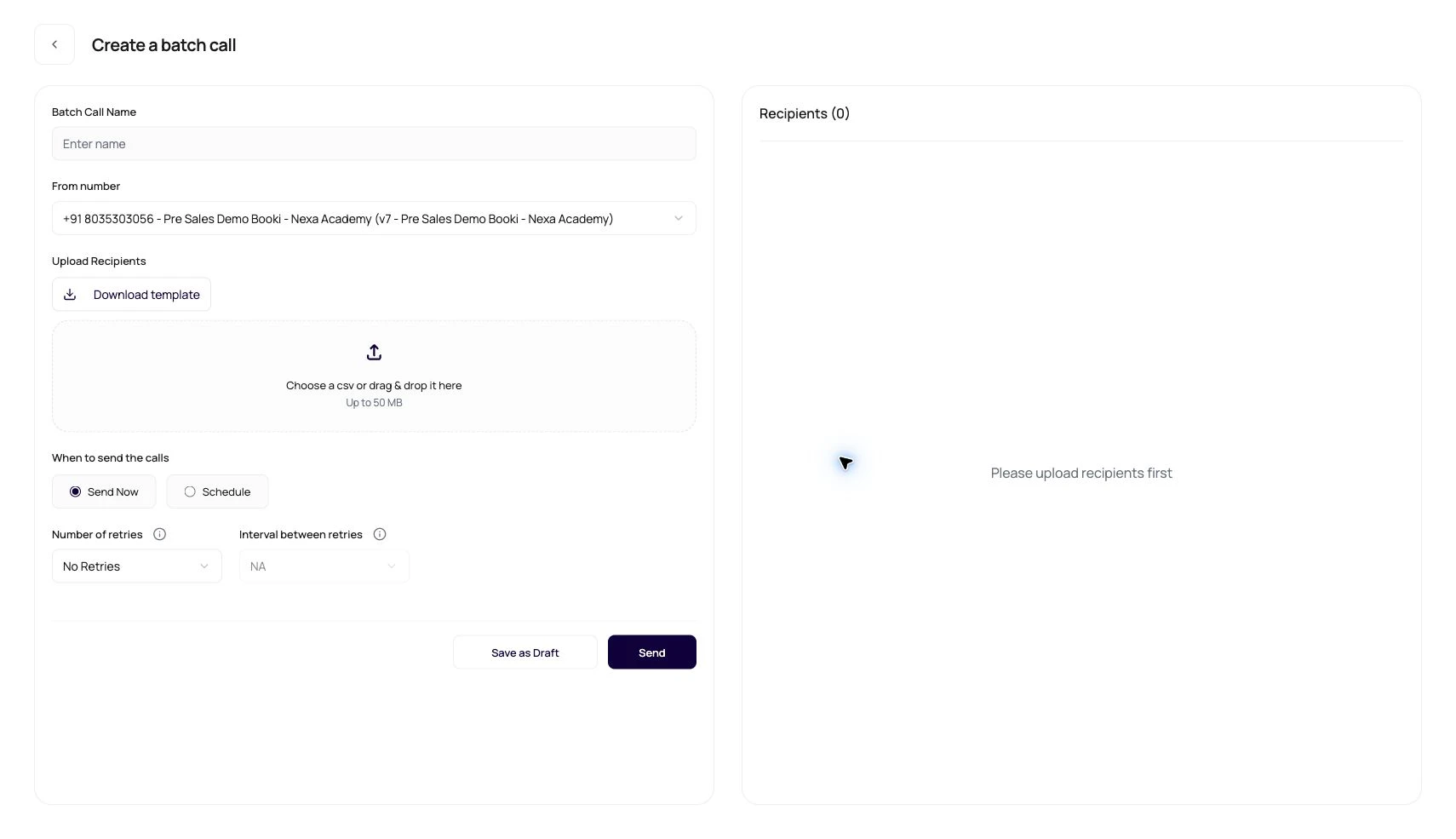
Retry settings are configured before launch.
| Control | Behavior |
| -------------- | -------------------------------------------------------------------------------------------------------------------------------------------- |
| Retry count | Number of additional attempts after the first attempt. The create page validates this value before sending. |
| Retry interval | Time between retry attempts. The create page validates that a non-zero retry count has a non-zero interval. |
| Zero retries | Each recipient receives only the first attempt. |
| Retry history | Call History can expand a call row to show retry attempts. |
| Retry expiry | A recipient can end as `retry_expired` when retry handling no longer has an eligible attempt. |
| Paused retries | Retries that have not dialed yet stay queued while the campaign is paused. When resumed, DialNexa releases them relative to the resume time. |
## Campaign Counters And Attempts
Use counters to understand campaign progress, but use Call History for exact recipient evidence.
| Counter | What it means |
| ------------------ | --------------------------------------------------------------------------------------------------------------------------------------------------------------- |
| Recipients | Total recipients loaded into the campaign. |
| Attempts | Placed initial and retry attempts. Rows with retries can show a tooltip that breaks attempts into Initial call, 1st retry, 2nd retry, 3rd retry, and 4th retry. |
| Picked Up | Initial and retry call attempts whose call log reached `completed`. In-progress and unanswered outcomes are excluded. |
| Last Call Sent | Latest dispatch time across initial calls and retry children. A later retry can move this timestamp forward. |
| Completed leads | Calls counted as completed. |
| Failed leads | Calls counted as failed, including failed, busy, and no-answer outcomes. |
| Did not pick count | Calls counted as did not pick. |
Attempt totals are stage-based. The initial stage uses the campaign recipient count. Retry stages use the retries that were scheduled for that depth. A queued, expired, or cancelled retry is still part of the stage total, but it is not counted as attempted until it leaves the queued state.
The Picked Up label is based on completed call logs, not only the first call placed for each recipient. A recipient with a completed retry can therefore increase Picked Up after the initial attempt failed or went unanswered.
## How Statuses Affect Exports
Open Call History through the batch campaign or use the batch call id filter.
Export completed, failed, cancelled, did-not-pick, busy, no-answer, and retry-expired groups separately when operations needs different follow-up.
`created`, `initiated`, `sent`, and `received` are not final outcomes.
Use `end_reason` to separate invalid numbers, busy lines, destination blocks, voicemail, capacity, and balance problems.
## Tune Retries For A Campaign
Estimate answer rate, busy rate, and invalid-number rate before scaling.
Avoid retrying so quickly that recipients experience duplicate calls.
Compare completed, did not pick, busy, no answer, failed, cancelled, and retry expired rows.
Remove invalid numbers, update preferred timing, and adjust the message before the next campaign.
## Troubleshooting Batch Statuses
Check start time, workspace readiness, outbound number assignment, wallet balance, and whether another campaign is already running for the organization.
Give the scheduler and provider updates time to progress. If rows stay stale, inspect route readiness and queue processing.
Calls already initiated before cancellation can still finish. Cancellation stops queued and future work.
That is expected. Pending retries stay as outstanding work while paused, then resume from a fresh retry time when the campaign is resumed.
Count the first attempt plus additional retries. Retry count controls extra attempts, not total attempts.
## Related Reading
Read recipient outcomes and export rows.
Filter and inspect campaign-linked calls.
Inspect retry chains.
Compare call, batch, workflow, and transfer statuses.
## DialNexa Batch Call Retry And Status Values
These statuses apply to the campaign container.
| Status | Final? | What it means | What to do next |
| ----------- | ----------------------------- | ---------------------------------------------------------------------------------------------------------------------------------------------------------------------------------- | ------------------------------------------------------------------------------------------------------ |
| `draft` | No | The campaign is saved for review and is not placing calls. | Review recipients, dynamic variables, number, schedule, and retries. |
| `scheduled` | No | The campaign has a future start time and is waiting for that window. | Confirm the schedule, number, wallet, and recipient file before the start time. |
| `waiting` | No | The campaign is accepted but waiting for the organization queue, start window, or another batch ahead of it. | Let the earlier batch finish, or pause or cancel if this batch should not run next. |
| `running` | No | DialNexa is preparing, sending, or monitoring calls for the campaign. This is the only active sending state. | Watch Call History, attempts, picked-up count, and retry history. Pause before cancelling permanently. |
| `paused` | No | New call processing is stopped temporarily. Calls already initiated can still finish. Pending retry calls are parked so they do not continue dialing while the campaign is paused. | Resume when ready or cancel if the campaign should stop permanently. |
| `completed` | Yes | No pending direct calls or retry children remain for the campaign. | Export results and separate completed, failed, and did-not-pick groups. |
| `cancelled` | Yes | The campaign was stopped permanently. Queued calls and queued retry children can be marked `cancelled`. | Create a new campaign if you need to call the list again. |
| `deleted` | Yes | The campaign is no longer active in normal batch operations. | Use remaining exports or audit records if you need historical evidence. |
| `active` | Compatibility value | Older data or filters may use this ready-state label. New scheduled and queued work should appear as `scheduled` or `waiting`. | Treat it as non-final, then fetch the batch for current details. |
| `initiated` | Compatibility acknowledgement | The create response was accepted and returned a batch id. It is not the long-running campaign state. | Fetch the batch or review Call History for the current status. |
## Batch Queue Conflicts
DialNexa runs one batch campaign per organization at a time. If another batch is already `running` or `waiting`, a new batch can enter `waiting` and start when the earlier queue clears. The dashboard also warns when a scheduled batch starts within the next 30 minutes, because it may affect when the new batch can begin.
Publishing an agent can also surface batch conflicts for the selected phone number. Resolve blocking campaigns before publishing: edit `draft` batches, pause `running` batches, and cancel `waiting` or `scheduled` batches when they should not use the agent or number.
## Recipient Call Statuses
Each recipient attempt becomes a call log. These statuses are the ones you filter and export from Call History.
| Call status | Final? | Meaning in a batch campaign | Common follow-up |
| --------------- | ------ | --------------------------------------------------------------------------------- | -------------------------------------------------------------------------- |
| `created` | No | The recipient call log exists and is queued or prepared. | Wait for progress. Investigate if it stays here too long. |
| `initiated` | No | Call setup has started. | Wait for provider updates. |
| `sent` | No | The outbound request was sent to the provider. | Monitor for connection or final outcome. |
| `received` | No | DialNexa received an inbound or provider callback event. | Wait for a later call event. |
| `completed` | Yes | The call connected and ended. | Review transcript, summary, fields, and `end_reason`. |
| `did_not_pick` | Yes | The recipient did not answer or voicemail was detected. | Retry if rules allow, or export for follow-up. |
| `busy` | Yes | The line was busy or rejected as busy. | Retry later or export with no-answer outcomes. |
| `no_answer` | Yes | The provider returned no answer. | Review route and retry strategy. |
| `failed` | Yes | The call failed before a useful conversation. | Inspect `end_reason`, number validity, route, wallet, and provider errors. |
| `cancelled` | Yes | The call was stopped before completion, often because the campaign was cancelled. | Confirm the cancellation was intentional. |
| `retry_expired` | Yes | Retry handling ended without a successful final result. | Review retry count, retry interval, and attempt history. |
## Retry Controls
Retry settings are configured before launch.
| Control | Behavior |
| -------------- | -------------------------------------------------------------------------------------------------------------------------------------------- |
| Retry count | Number of additional attempts after the first attempt. The create page validates this value before sending. |
| Retry interval | Time between retry attempts. The create page validates that a non-zero retry count has a non-zero interval. |
| Zero retries | Each recipient receives only the first attempt. |
| Retry history | Call History can expand a call row to show retry attempts. |
| Retry expiry | A recipient can end as `retry_expired` when retry handling no longer has an eligible attempt. |
| Paused retries | Retries that have not dialed yet stay queued while the campaign is paused. When resumed, DialNexa releases them relative to the resume time. |
## Campaign Counters And Attempts
Use counters to understand campaign progress, but use Call History for exact recipient evidence.
| Counter | What it means |
| ------------------ | --------------------------------------------------------------------------------------------------------------------------------------------------------------- |
| Recipients | Total recipients loaded into the campaign. |
| Attempts | Placed initial and retry attempts. Rows with retries can show a tooltip that breaks attempts into Initial call, 1st retry, 2nd retry, 3rd retry, and 4th retry. |
| Picked Up | Initial and retry call attempts whose call log reached `completed`. In-progress and unanswered outcomes are excluded. |
| Last Call Sent | Latest dispatch time across initial calls and retry children. A later retry can move this timestamp forward. |
| Completed leads | Calls counted as completed. |
| Failed leads | Calls counted as failed, including failed, busy, and no-answer outcomes. |
| Did not pick count | Calls counted as did not pick. |
Attempt totals are stage-based. The initial stage uses the campaign recipient count. Retry stages use the retries that were scheduled for that depth. A queued, expired, or cancelled retry is still part of the stage total, but it is not counted as attempted until it leaves the queued state.
The Picked Up label is based on completed call logs, not only the first call placed for each recipient. A recipient with a completed retry can therefore increase Picked Up after the initial attempt failed or went unanswered.
## How Statuses Affect Exports
Open Call History through the batch campaign or use the batch call id filter.
Export completed, failed, cancelled, did-not-pick, busy, no-answer, and retry-expired groups separately when operations needs different follow-up.
`created`, `initiated`, `sent`, and `received` are not final outcomes.
Use `end_reason` to separate invalid numbers, busy lines, destination blocks, voicemail, capacity, and balance problems.
## Tune Retries For A Campaign
Estimate answer rate, busy rate, and invalid-number rate before scaling.
Avoid retrying so quickly that recipients experience duplicate calls.
Compare completed, did not pick, busy, no answer, failed, cancelled, and retry expired rows.
Remove invalid numbers, update preferred timing, and adjust the message before the next campaign.
## Troubleshooting Batch Statuses
Check start time, workspace readiness, outbound number assignment, wallet balance, and whether another campaign is already running for the organization.
Give the scheduler and provider updates time to progress. If rows stay stale, inspect route readiness and queue processing.
Calls already initiated before cancellation can still finish. Cancellation stops queued and future work.
That is expected. Pending retries stay as outstanding work while paused, then resume from a fresh retry time when the campaign is resumed.
Count the first attempt plus additional retries. Retry count controls extra attempts, not total attempts.
## Related Reading
Read recipient outcomes and export rows.
Filter and inspect campaign-linked calls.
Inspect retry chains.
Compare call, batch, workflow, and transfer statuses.