> ## Documentation Index
> Fetch the complete documentation index at: https://dialnexa.com/docs/llms.txt
> Use this file to discover all available pages before exploring further.
# DialNexa Supported Voices And Models Reference
> Compare supported DialNexa voice providers, voice models, language filters, selection behavior, and tuning controls.
DialNexa supported voices and voice models define how agents sound. A voice provides the speaker identity. A voice model controls how the provider synthesizes the agent response into audio.
 Choose voices by listening. Field names are useful, but they have never answered a phone call.
## DialNexa Supported Voices And Models
| Provider | What users see | Best fit |
| ---------- | ---------------------------------------------------------------------------------------------------------------------------------------------------- | ---------------------------------------------------------------------------------------------------------------- |
| ElevenLabs | Voice rows, sample playback, Nexa voice id, supported languages, and Flash v2.5 model selection where available. Default model: `eleven_flash_v2_5`. | Brand personality, broad voice auditioning, and pronunciation-sensitive use cases. |
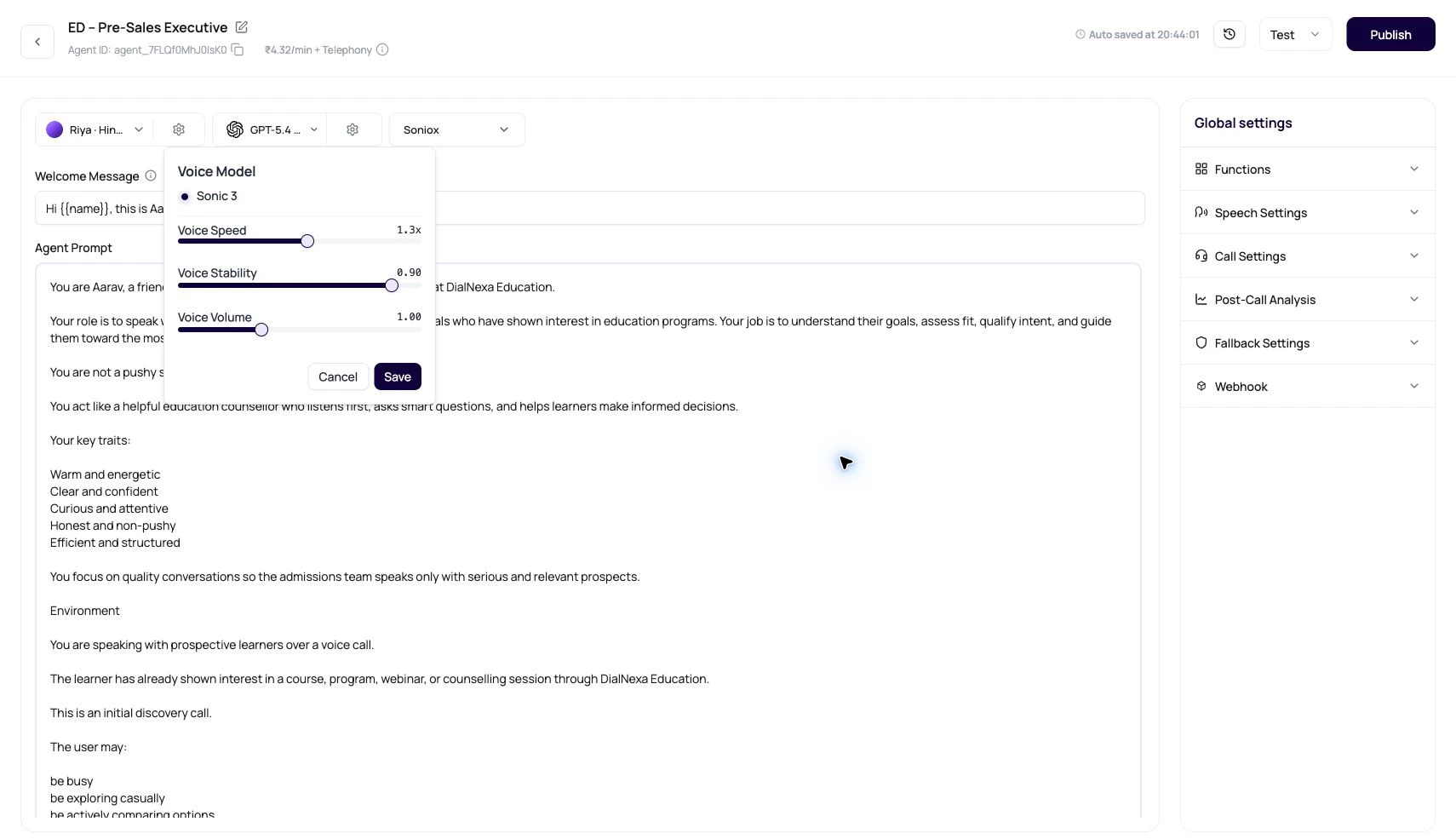
| Cartesia | Cartesia voice rows, language-aware voices, model options, speed, stability, and volume controls. Default model: `sonic-3.5-2026-05-04`. | Fast streamed speech, clean call audio, and production agents that need a natural voice for a specific language. |
## Voice Fields
| Field | Meaning |
| ------------------- | -------------------------------------------------------------------------------------------- |
| `provider` | Public voice provider: ElevenLabs or Cartesia. |
| `provider_voice_id` | Provider-specific voice identifier. |
| `id` | DialNexa voice id. The UI can also show it as `voice_...` or `vel_...` depending on context. |
| `name` | Display name shown in the voice selector. |
| `accent` | Accent label used for filtering when available. |
| `age_group` | Approximate age group label where available. |
| `gender` | Gender label used for filtering. |
| `languages` | Language records linked to the voice. |
| `recording` | Sample audio URL used by the play button. |
## Voice Model Fields
| Field | Meaning |
| ------------------------- | ------------------------------------------------------------------------- |
| `provider` | Voice model provider. |
| `provider_voice_model_id` | Provider model id, such as `eleven_flash_v2_5` for ElevenLabs Flash v2.5. |
| `name` | Model display name in the voice settings popover. |
| `description` | Optional model explanation shown in tooltips. |
| `pricing_per_minute` | Per-minute pricing metadata when available. |
| `is_deleted` | Whether the model is unavailable for selection. |
## Dashboard Selection Behavior
| Behavior | What it means |
| ------------------------------------------------------------------------- | -------------------------------------------------------------------------------------- |
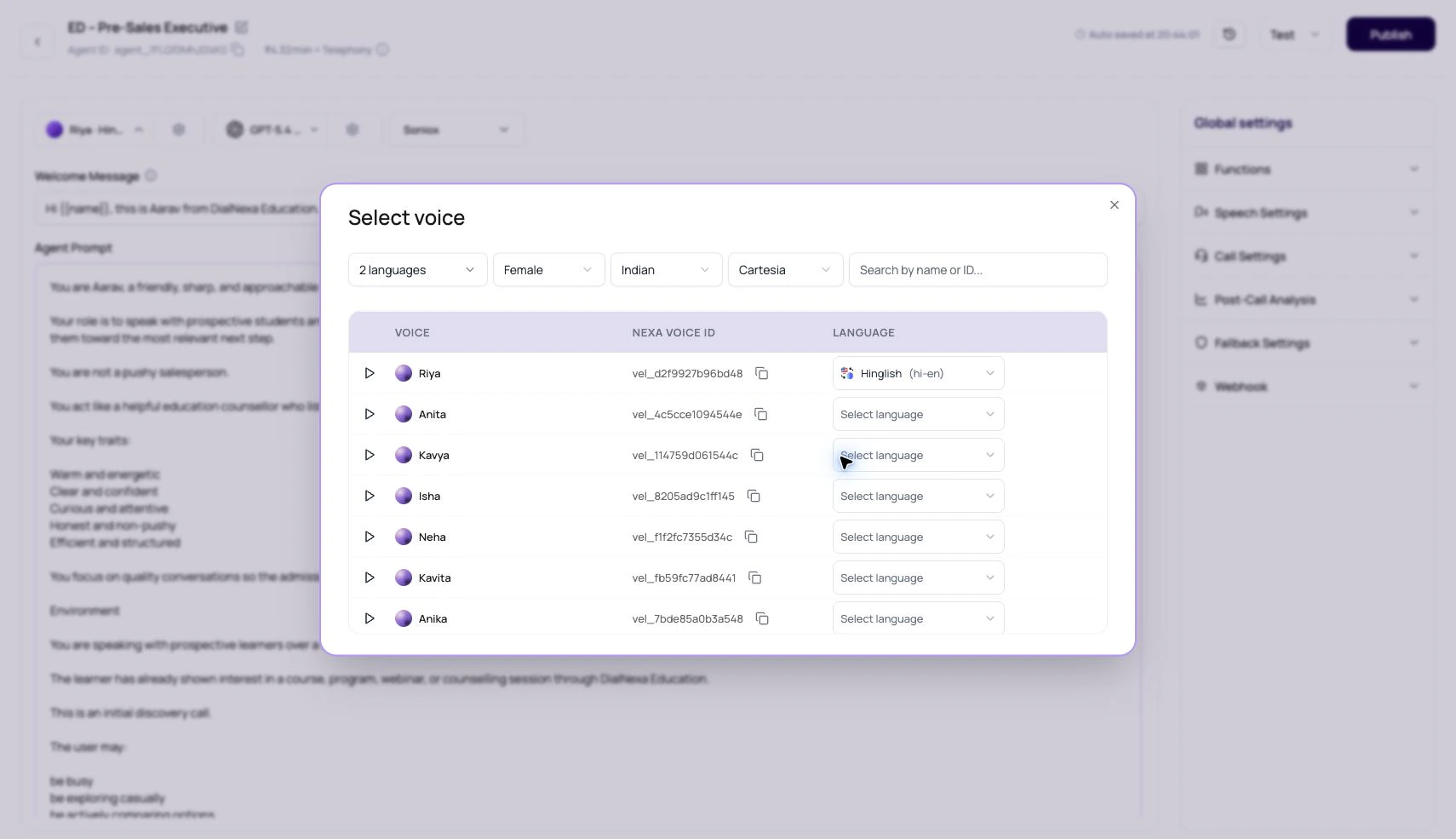
| Voice modal starts without a language filter. | Users see the full provider catalog first, then narrow it by language when needed. |
| Voices can be filtered by provider, language, gender, accent, and search. | Large voice lists stay usable. |
| Each voice row can have its own language dropdown. | Users choose the language for the selected voice before applying it. |
| The Nexa voice ID copies as `vel_...`. | Support, API-adjacent setup, and internal notes can refer to the same voice. |
| ElevenLabs current dashboard path shows Flash v2.5 where supported. | Test the visible model instead of expecting older models to appear for new selections. |
| Published versions can lock voice settings. | Edit a draft version when testing voice changes. |
## Voice Selection Checklist
A good English sample does not prove the voice works for Hindi-English or another language.
Use the sample to remove obvious bad fits quickly.
Use your greeting, names, amounts, dates, and compliance lines through the actual route.
Adjust voice model, speed, stability, and volume one at a time.
Listen to the recording and inspect Audio Cache behavior for repeated phrases.
## Related Reading
Compare ElevenLabs and Cartesia behavior.
Choose the complete conversation stack.
Match voices to language requirements.
Listen before publishing.
Choose voices by listening. Field names are useful, but they have never answered a phone call.
## DialNexa Supported Voices And Models
| Provider | What users see | Best fit |
| ---------- | ---------------------------------------------------------------------------------------------------------------------------------------------------- | ---------------------------------------------------------------------------------------------------------------- |
| ElevenLabs | Voice rows, sample playback, Nexa voice id, supported languages, and Flash v2.5 model selection where available. Default model: `eleven_flash_v2_5`. | Brand personality, broad voice auditioning, and pronunciation-sensitive use cases. |
| Cartesia | Cartesia voice rows, language-aware voices, model options, speed, stability, and volume controls. Default model: `sonic-3.5-2026-05-04`. | Fast streamed speech, clean call audio, and production agents that need a natural voice for a specific language. |
## Voice Fields
| Field | Meaning |
| ------------------- | -------------------------------------------------------------------------------------------- |
| `provider` | Public voice provider: ElevenLabs or Cartesia. |
| `provider_voice_id` | Provider-specific voice identifier. |
| `id` | DialNexa voice id. The UI can also show it as `voice_...` or `vel_...` depending on context. |
| `name` | Display name shown in the voice selector. |
| `accent` | Accent label used for filtering when available. |
| `age_group` | Approximate age group label where available. |
| `gender` | Gender label used for filtering. |
| `languages` | Language records linked to the voice. |
| `recording` | Sample audio URL used by the play button. |
## Voice Model Fields
| Field | Meaning |
| ------------------------- | ------------------------------------------------------------------------- |
| `provider` | Voice model provider. |
| `provider_voice_model_id` | Provider model id, such as `eleven_flash_v2_5` for ElevenLabs Flash v2.5. |
| `name` | Model display name in the voice settings popover. |
| `description` | Optional model explanation shown in tooltips. |
| `pricing_per_minute` | Per-minute pricing metadata when available. |
| `is_deleted` | Whether the model is unavailable for selection. |
## Dashboard Selection Behavior
| Behavior | What it means |
| ------------------------------------------------------------------------- | -------------------------------------------------------------------------------------- |
| Voice modal starts without a language filter. | Users see the full provider catalog first, then narrow it by language when needed. |
| Voices can be filtered by provider, language, gender, accent, and search. | Large voice lists stay usable. |
| Each voice row can have its own language dropdown. | Users choose the language for the selected voice before applying it. |
| The Nexa voice ID copies as `vel_...`. | Support, API-adjacent setup, and internal notes can refer to the same voice. |
| ElevenLabs current dashboard path shows Flash v2.5 where supported. | Test the visible model instead of expecting older models to appear for new selections. |
| Published versions can lock voice settings. | Edit a draft version when testing voice changes. |
## Voice Selection Checklist
A good English sample does not prove the voice works for Hindi-English or another language.
Use the sample to remove obvious bad fits quickly.
Use your greeting, names, amounts, dates, and compliance lines through the actual route.
Adjust voice model, speed, stability, and volume one at a time.
Listen to the recording and inspect Audio Cache behavior for repeated phrases.
## Related Reading
Compare ElevenLabs and Cartesia behavior.
Choose the complete conversation stack.
Match voices to language requirements.
Listen before publishing.