> ## Documentation Index
> Fetch the complete documentation index at: https://dialnexa.com/docs/llms.txt
> Use this file to discover all available pages before exploring further.
# Latency Turn Taking And Interruptions In DialNexa
> Improve DialNexa voice AI latency, turn taking, interruptions, response timing, provider selection, caching, and function behavior.
Latency and turn taking decide whether a DialNexa Voice AI call feels natural. A good agent hears enough caller speech, replies quickly enough, avoids talking over people, and recovers when callers interrupt.
A half-second pause can feel polite. A five-second pause feels like the call fell into a spreadsheet.
## DialNexa Voice AI Latency And Turn Taking Chain
Every response passes through a chain. The slowest link becomes the caller's experience.
| Stage | What happens | Common delay source |
| -------------- | ---------------------------------------------------------- | ----------------------------------------------------------------- |
| Caller audio | Phone, SIP, or web audio reaches DialNexa. | Poor network, low-volume caller, noisy room, or telephony bridge. |
| Speech to text | Deepgram or Soniox converts audio into text. | Endpointing, language fit, noise, and interruption handling. |
| LLM reasoning | OpenAI, Google, or Groq produces the next reply or action. | Long prompt, slow model, function call, or fallback delay. |
| Text to speech | ElevenLabs or Cartesia turns text into audio. | Voice model latency, long responses, cache miss. |
| Playback | Audio streams back to the caller. | Phone path, bridge delay, interruption handling. |
## Provider Choices That Affect Timing
| Provider or feature | Timing effect | Use when |
| ------------------------ | ------------------------------------------------------------------------------------------------------------------------------- | -------------------------------------------------------------------------------------------- |
| Deepgram Flux | Fast turn lifecycle signals for English and supported multilingual tests. | You want quick turn boundaries and have verified the selected language on real caller audio. |
| Soniox STT RT v5 | Response Eagerness can tune how quickly the agent replies. | Hinglish or Hindi-English calls need a patient but responsive listener. |
| Fallback LLM | Can reduce response delay when the primary model is slow. New agents prefer Gemini 3.1 Flash Lite for fallback where available. | You have measured LLM latency as the issue. |
| Audio Cache | Reduces repeated text-to-speech startup time. | The agent repeats exact phrases across calls. |
| Custom functions | Can pause the conversation while waiting for your API. | Only when the action is necessary before the agent can continue. |
| Web call provider warmup | Returns the browser websocket while provider warmup continues in the background. | Web calls should start without waiting for every provider connection to finish warming. |
## Settings That Change Timing Directly
| Setting | Where it lives | Practical note |
| ------------------------ | ------------------------------------------------------ | ------------------------------------------------------------------------------------------------------------------------------------------------------- |
| Response Eagerness | Speech Settings for Soniox. | Moves the agent between patient and eager turn handling. |
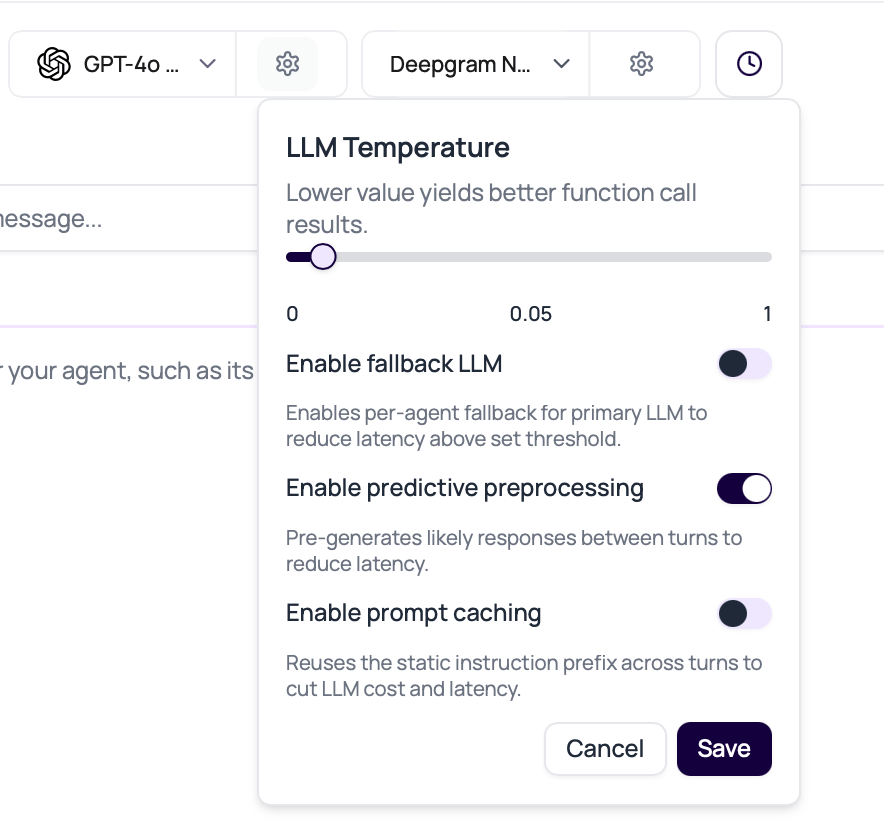
| Fallback LLM delay | Model settings popover. | Defaults to `0 ms` in new agent configuration when no saved value exists. Increase it if the primary model should get more time before fallback starts. |
| Predictive preprocessing | Model settings for non-flow agents. | Pre-generates likely responses between turns when the next line is predictable. |
| Prompt Caching | Model settings popover where the workspace has access. | Reuses a stable OpenAI prompt prefix across turns to reduce repeated model work. |
| Audio Cache | Speech Settings. | Helps only when text and voice configuration repeat. |
| End call on silence | Call Settings. | Prevents endless silence, but an aggressive value can end calls while callers are thinking. |
 ## Diagnose Timing Problems
| Symptom | First places to inspect |
| ------------------------------------------------- | ---------------------------------------------------------------------------------------------------------------- |
| Agent answers too early | Response Eagerness, transcript boundary, caller pause length, welcome message length. |
| Agent talks over caller | Transcriber choice, interruption behavior, audio overlap, prompt style. |
| Agent waits too long | LLM latency, custom function latency, voice synthesis, cache misses, endpointing. |
| Call ends while caller is thinking | Silence timeout, reminder interval, prompt pacing, caller environment. |
| First sentence is fast but later replies are slow | LLM or function latency, not the welcome message. |
| Repeated phrases are slow | Audio Cache disabled, phrase variation, or voice model delay. |
| Web call creation fails before connection | Agent version, wallet, provider readiness, or Speech session creation. A real creation failure can return `502`. |
| Agent speech has gaps mid-sentence | TTS segmenting, provider latency, or playback ordering. Review recording and provider choice. |
## Healthy Cache Misses
Predictive preprocessing and Prompt Caching are optimizations. A miss or skipped lookup can be the correct behavior.
| Cache path | Healthy miss reason |
| --------------------------------------- | ------------------------------------------------------------------------------------------------------------------------------------------------------------------------------------------- |
| Predictive preprocessing | The utterance is for a later turn than the prediction, the cached response would repeat the last assistant answer, or the caller uses a non-Latin script outside the configured allowlist. |
| Predictive preprocessing language guard | The caller utterance and cached prediction use different scripts, such as Latin text versus Devanagari text. DialNexa skips the cached response instead of answering in the wrong language. |
| Prompt Caching | The live model path is not safe for OpenAI prompt-cache fields, a dynamic value is missing, or the prompt uses placeholder syntax that cannot be split safely. |
## A Practical Tuning Order
Start with the recording. Transcript text alone cannot show silence, overlap, breathing room, or whether the caller was interrupted.
See whether the caller's final words appear before the agent responds. If not, tune transcription and response timing first.
Long welcomes and long answers increase the chance of overlap. A concise line often beats a philosophical paragraph.
Adjust Response Eagerness, transcriber, fallback LLM, Audio Cache, or silence timeout one at a time.
Ask the test caller to interrupt, correct themselves, pause, and answer with short phrases.
## Common Timing Traps
If the agent is waiting for an API response, voice speed will not fix it. Check function latency and timeout behavior.
A very low fallback delay can race models unnecessarily. Start with a measured delay and inspect which model wins.
People think, search, ask someone nearby, or look up details. Give them enough space.
A quick wrong answer is still wrong. Balance response speed with transcript quality and instruction following.
## Related Reading
Tune Response Eagerness, Audio Cache, and Denoising Mode.
Compare transcriber timing behavior.
Understand fallback LLMs and model latency.
Review evidence after a call.
## Diagnose Timing Problems
| Symptom | First places to inspect |
| ------------------------------------------------- | ---------------------------------------------------------------------------------------------------------------- |
| Agent answers too early | Response Eagerness, transcript boundary, caller pause length, welcome message length. |
| Agent talks over caller | Transcriber choice, interruption behavior, audio overlap, prompt style. |
| Agent waits too long | LLM latency, custom function latency, voice synthesis, cache misses, endpointing. |
| Call ends while caller is thinking | Silence timeout, reminder interval, prompt pacing, caller environment. |
| First sentence is fast but later replies are slow | LLM or function latency, not the welcome message. |
| Repeated phrases are slow | Audio Cache disabled, phrase variation, or voice model delay. |
| Web call creation fails before connection | Agent version, wallet, provider readiness, or Speech session creation. A real creation failure can return `502`. |
| Agent speech has gaps mid-sentence | TTS segmenting, provider latency, or playback ordering. Review recording and provider choice. |
## Healthy Cache Misses
Predictive preprocessing and Prompt Caching are optimizations. A miss or skipped lookup can be the correct behavior.
| Cache path | Healthy miss reason |
| --------------------------------------- | ------------------------------------------------------------------------------------------------------------------------------------------------------------------------------------------- |
| Predictive preprocessing | The utterance is for a later turn than the prediction, the cached response would repeat the last assistant answer, or the caller uses a non-Latin script outside the configured allowlist. |
| Predictive preprocessing language guard | The caller utterance and cached prediction use different scripts, such as Latin text versus Devanagari text. DialNexa skips the cached response instead of answering in the wrong language. |
| Prompt Caching | The live model path is not safe for OpenAI prompt-cache fields, a dynamic value is missing, or the prompt uses placeholder syntax that cannot be split safely. |
## A Practical Tuning Order
Start with the recording. Transcript text alone cannot show silence, overlap, breathing room, or whether the caller was interrupted.
See whether the caller's final words appear before the agent responds. If not, tune transcription and response timing first.
Long welcomes and long answers increase the chance of overlap. A concise line often beats a philosophical paragraph.
Adjust Response Eagerness, transcriber, fallback LLM, Audio Cache, or silence timeout one at a time.
Ask the test caller to interrupt, correct themselves, pause, and answer with short phrases.
## Common Timing Traps
If the agent is waiting for an API response, voice speed will not fix it. Check function latency and timeout behavior.
A very low fallback delay can race models unnecessarily. Start with a measured delay and inspect which model wins.
People think, search, ask someone nearby, or look up details. Give them enough space.
A quick wrong answer is still wrong. Balance response speed with transcript quality and instruction following.
## Related Reading
Tune Response Eagerness, Audio Cache, and Denoising Mode.
Compare transcriber timing behavior.
Understand fallback LLMs and model latency.
Review evidence after a call.