

Before You Begin
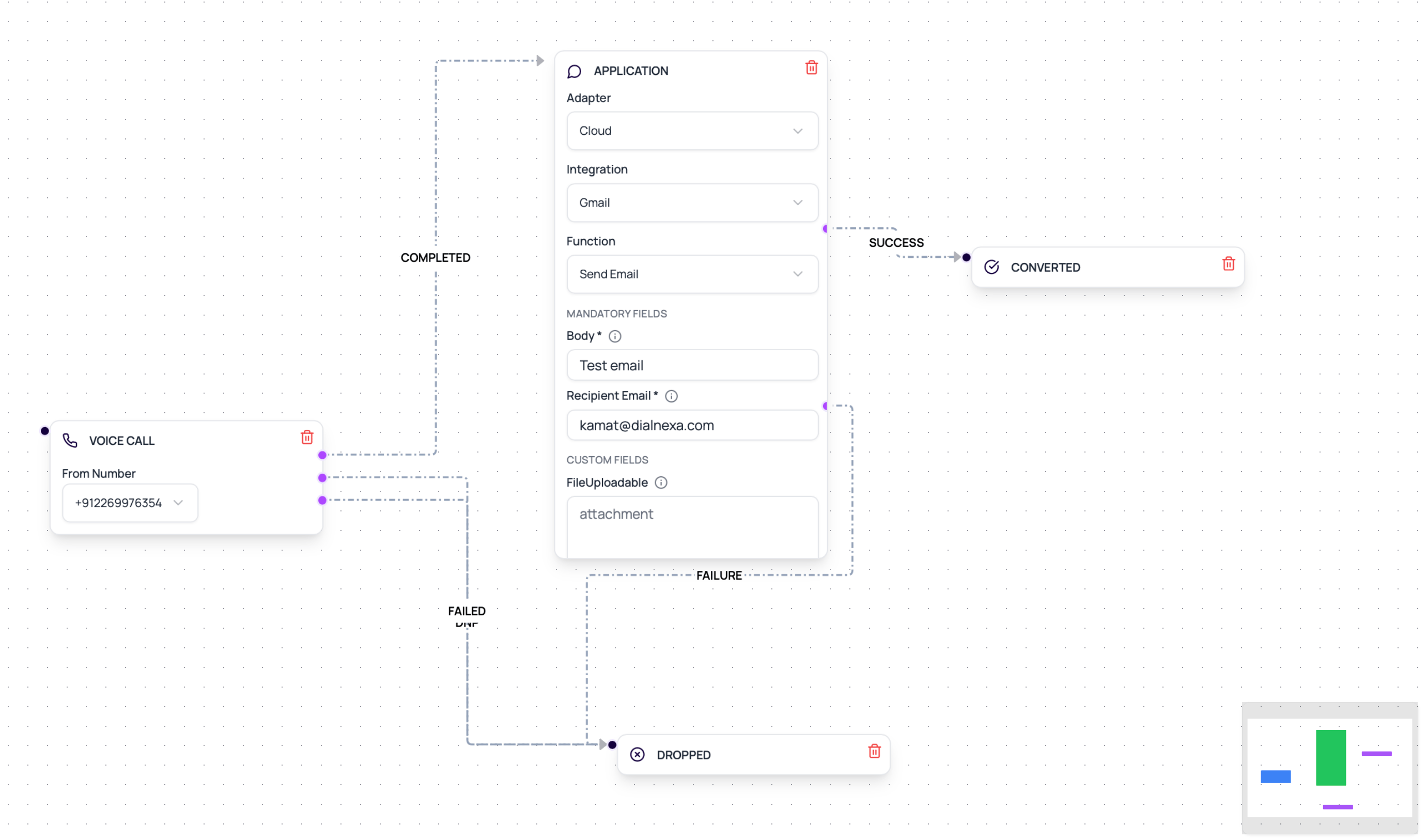
Connect and validate the provider, prepare test lead values, map every required field, and wire explicit success and failure outputs before activation.DialNexa Workflow Integration Fields
These are the stored configuration keys behind an Application node - you never type them by hand. Picking the integration, action, and template in the node’s dropdowns fills them in.Data Mapping Sources
Lead variables
Values uploaded with the lead, such as name, phone number, email, city, or appointment date.
Call attributes
Runtime call values and post-call analysis values, such as interested, reason, preferred time, or support issue.
Static config
Fixed template name, broadcast name, subject, or text body.
Invocation response
Provider message id, response payload, error code, and latency.
Wati And Resend Workflow Examples
Build A Reliable Application Node
1
Validate provider connection
Do this before adding the node to an active workflow.
2
Choose Cloud mode for connected actions
Cloud mode loads connected integrations and their workflow-safe functions.
3
Map every required field
Use lead variables, post-call analysis fields, call attributes, or static values. Empty fields should be intentional, not surprising.
4
Name outputs clearly
Success and failure paths should be obvious on the canvas.
5
Test one lead
Open lead history and check the integration invocation result.
6
Scale only after evidence is clean
One successful test should show correct request payload, provider response, and downstream branch.
100 at approximately INR 1.79 per batch. Billing does not block workflow execution, so review integration invocation evidence and wallet transactions together.
Workflow Integration Mistakes
No failure branch
No failure branch
Provider actions can fail because of credentials, rate limits, template rules, missing fields, or invalid recipient data. Always route failure.
Static test data left in production
Static test data left in production
Replace hard-coded email addresses, phone numbers, and template parameters before launch.
Using call text instead of extracted fields
Using call text instead of extracted fields
If a workflow needs a stable value, extract it into a post-call field first and map that field.
Action placed before data exists
Action placed before data exists
A workflow node can only map fields that are already available at that point in the workflow.
Verify The Workflow Integration
Run one successful action and one controlled failure. Confirm the lead follows the correct output and the invocation evidence shows the expected provider, action, fields, response, and latency.Related Reading
Application Nodes
Configure the workflow node.
Lead Variables
Map data into actions.
WhatsApp With Wati
Send WhatsApp messages.
Email With Resend
Send email messages.