

Before You Begin
Confirm the document is current, permitted for agent use, readable without missing context, and free of secrets or content the agent should not disclose.Manage DialNexa Knowledge Base Documents
These actions keep knowledge content current.Knowledge Base Page Actions
The Knowledge Base page shows workspace knowledge bases in the sidebar. Selecting a knowledge base opens its details, document list, and actions.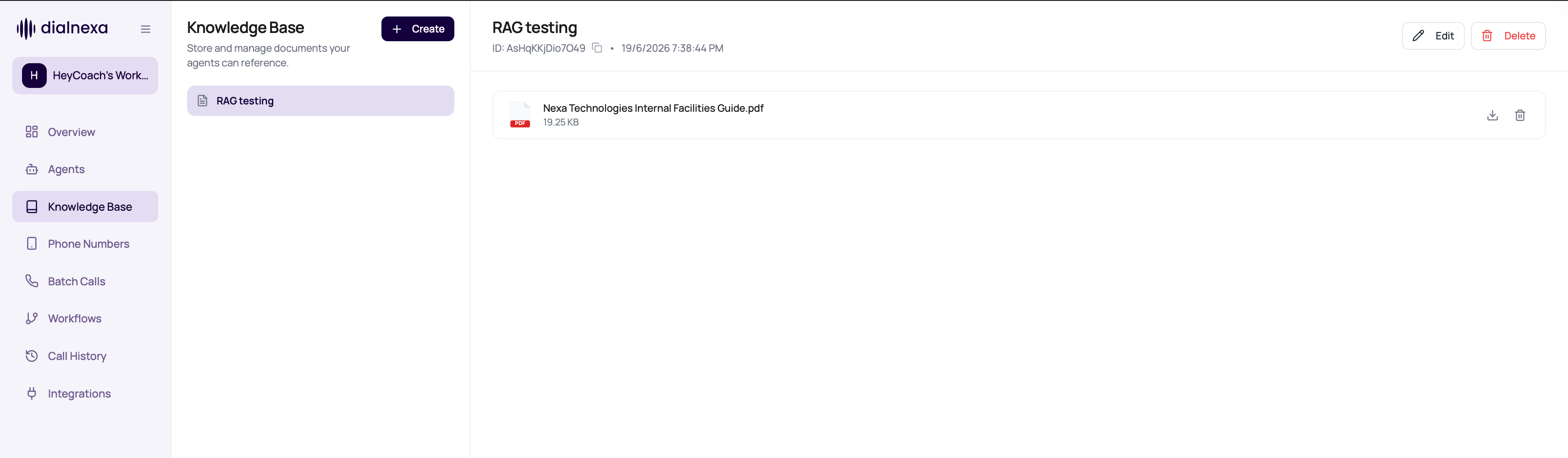
Knowledge base deletion is blocked while any agent still references it in the current draft or latest published version. The conflict response lists the affected agent IDs. Remove the knowledge base from those agent versions, publish any replacement draft when needed, then retry deletion.
Maintain Knowledge Quality
1
Review content owner
Know who approves each document.
2
Replace stale documents
Update or delete documents when policies change.
3
Check affected agents before deletion
Review the affected agent IDs before deleting a knowledge base. Unlink the knowledge base from each current draft or latest published version first.
4
Retest agent answers
Ask questions covered by changed documents.
5
Use call evidence
If the agent answered incorrectly, compare transcript and knowledge content.
Document Management Mistakes
Uploading duplicates
Uploading duplicates
Duplicate content can confuse review and maintenance.
Deleting without retesting
Deleting without retesting
The agent may lose an answer path.
Using vague titles
Using vague titles
Reviewers need to know what each document contains.
Ignoring source
Ignoring source
Add source labels when documents come from different teams or systems.
Verify Document Changes
Confirm the document reaches the expected processing state, then ask the attached agent a question whose answer exists in the document and one whose answer does not.Related Reading
Documents And Limits
Prepare uploads.
Using Knowledge In Agents
Connect knowledge to callers.
Call Detail Page
Review answers.