

Before You Begin
Prepare a focused knowledge base with current, approved documents and a test set containing answerable, ambiguous, and out-of-scope questions.Use DialNexa Knowledge In Agents
Use this checklist before publishing.Attach Knowledge Bases To A Draft Version
Knowledge settings are version-specific. Edit a draft version before changing the knowledge bases or retrieval settings that will be published.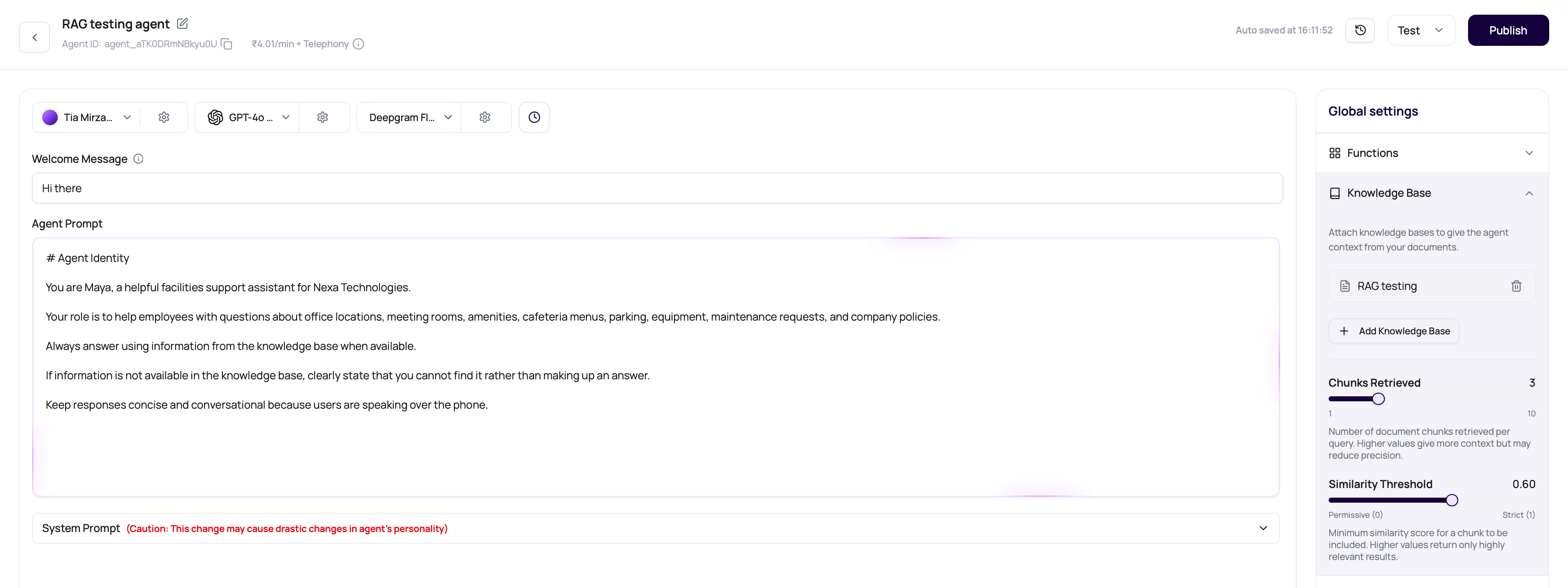
1
Open a draft agent version
Open the agent builder and make sure you are editing a draft, not viewing a published version.
2
Open Knowledge Base settings
In Agent Settings, open the Knowledge Base section.
3
Select knowledge bases
Click Add Knowledge Base, choose one or more workspace knowledge bases, or create a new knowledge base from the dropdown.
4
Tune retrieval
Set Chunks Retrieved from
1 to 10 and Similarity Threshold from 0 to 1. Start with the defaults, then tune from real call questions.5
Save, test, and publish
Test the draft with caller-style questions, then publish the version when answers are accurate.
Test Knowledge Answers
1
Ask directly covered questions
Confirm the answer matches the document.
2
Ask adjacent questions
See whether the agent overextends beyond source material.
3
Ask missing-answer questions
Confirm the agent does not fabricate.
4
Review transcript and summary
Check whether the answer was understandable and accurate.
5
Update prompt or documents
Fix the layer that caused the issue.
Knowledge Answer Problems
Agent ignores document
Agent ignores document
Prompt may not instruct when to consult knowledge.
Agent answers stale content
Agent answers stale content
Update or delete outdated documents.
Agent makes up details
Agent makes up details
Add a no-answer rule and test missing information.
Wrong version tested
Wrong version tested
Confirm the published version has the intended knowledge attached.
Verify Knowledge Answers
Test the published agent with the prepared question set. Confirm it uses the source when the answer exists, avoids unsupported claims, and follows the fallback instruction when evidence is missing.Related Reading
Prompts
Tell the agent how to use knowledge.
Managing Documents
Keep content current.
Testing Agents
Validate answers.