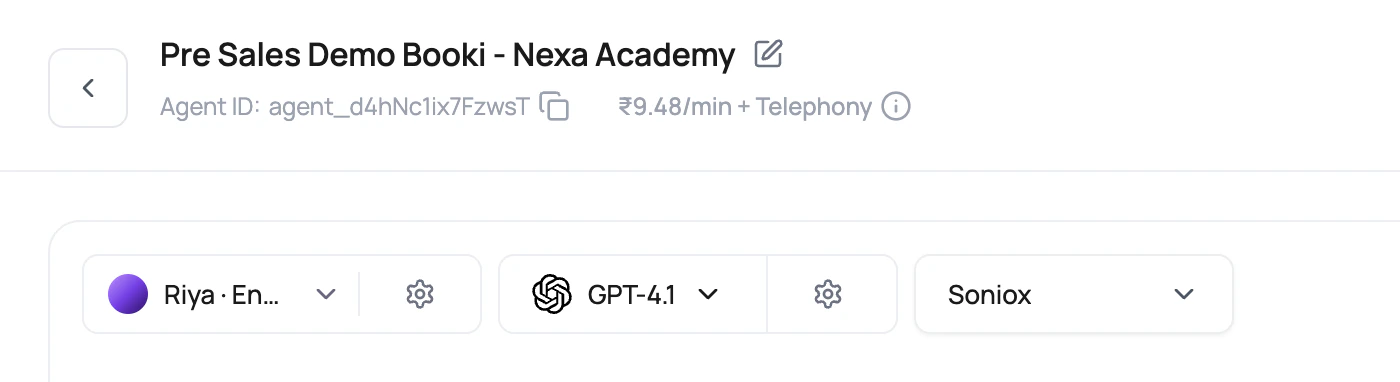

What Each Selector Owns
| Selector | What it controls | Concrete dashboard behavior |
|---|---|---|
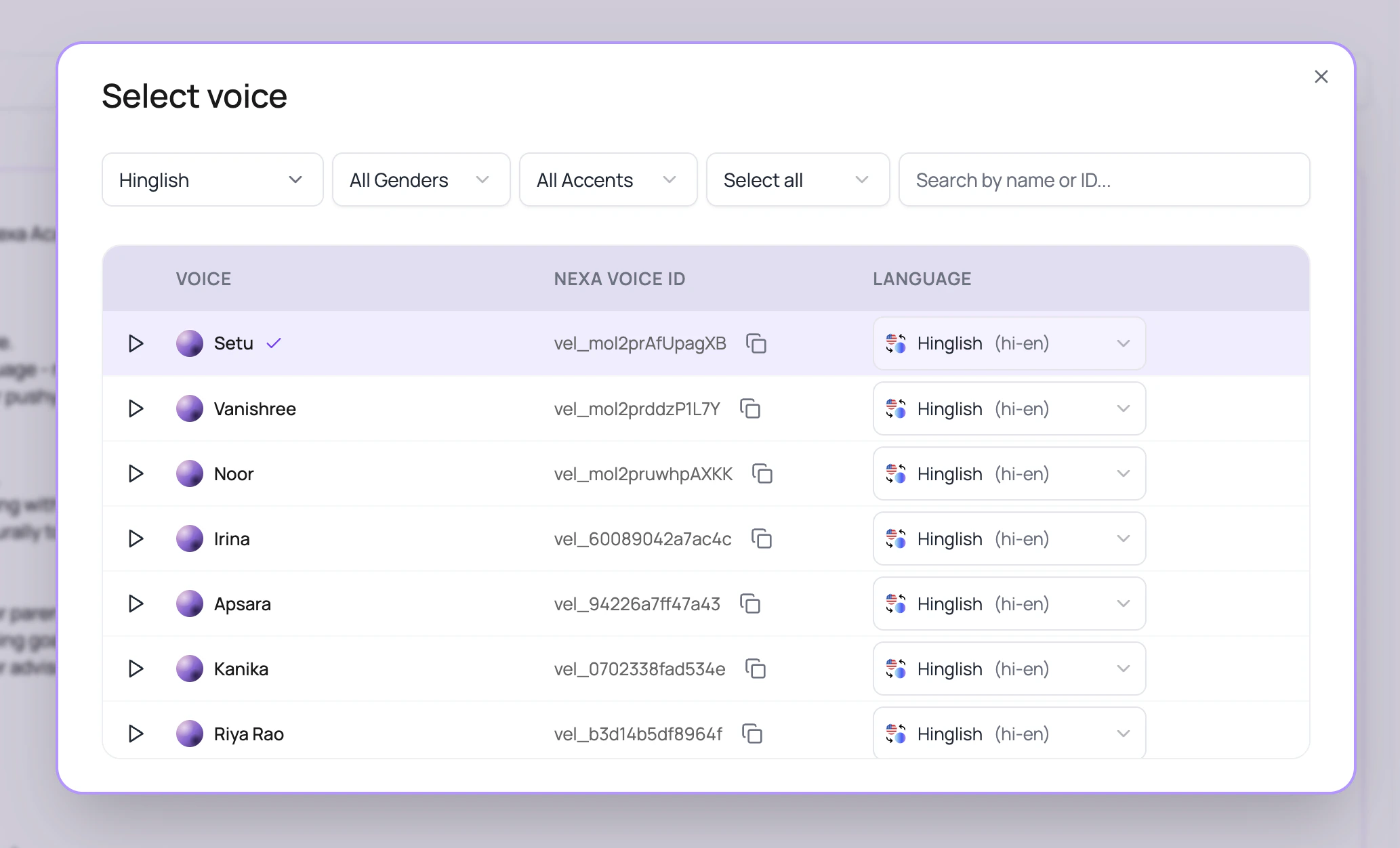
| Voice | Speaker identity, provider, sample audio, provider voice id, Nexa voice id, and voice language options. | The voice modal can search by name, provider voice id, raw voice id, voice_ id, or vel_ id. |
| Language | The language used by the agent version and compatibility rules. | In the newer builder, language is selected per voice row. In legacy layouts, a separate language selector can appear. |
| Voice model | Text to speech model allowed for the selected voice. | ElevenLabs selection currently standardizes on Flash v2.5 for supported dashboard choices. |
| LLM model | Reasoning, tool calls, structured output, fallback behavior, pipeline type, and model cost. | Cascaded agents default to GPT-4o Mini when available. Speech to Speech agents show only speech-to-speech models. |
| Transcriber | Speech to text provider, primary model, and optional fallback STT. | The current transcriber selector lists Deepgram and Soniox choices, excludes AssemblyAI from new primary and fallback choices, and shows INR per minute where available. |
Selection Order That Avoids Rework
Pick the caller language first
Start with English, Hindi, Hindi-English, or another enabled language. Language decides which voice rows are useful and which transcribers are valid.
Choose the transcriber
For cascaded agents, use Deepgram Flux for English-only agents or Soniox for Hindi-English, multilingual, Indian English, or accent-heavy calls. If primary STT latency is a concern, open the transcriber settings and configure fallback STT.
Choose the voice
Open the voice modal, filter by language, listen to samples, copy the Nexa voice ID if needed, and choose the row language before clicking Use Voice.
Choose the model
Pick the LLM model after the listening and speaking layer is sensible. A strong model cannot reason over words the transcriber never heard.
Compatibility Rules The Builder Applies
| Rule | What users experience | Why it matters |
|---|---|---|
| Deepgram Flux is English only in the UI. | If Flux is selected while a non-English language is active, the dashboard can move the language back to English where possible. | Flux is for English turn boundaries, not broad multilingual calls. |
| Speech to Speech agents use a direct speech model. | Voice model, transcriber, and Audio Cache controls are hidden or ignored for Speech to Speech agents. | The realtime model listens and speaks directly instead of using separate STT and TTS services. |
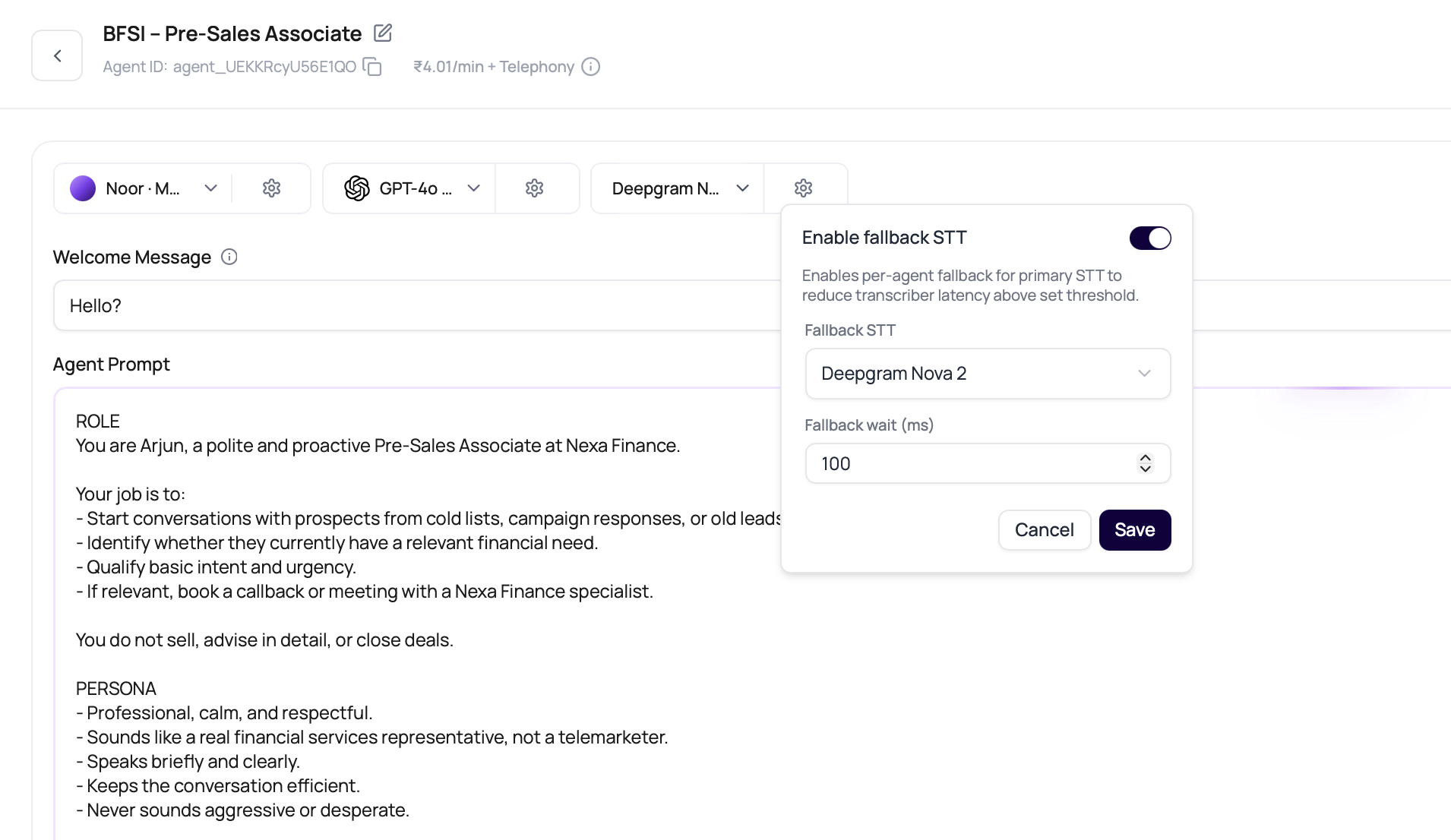
| Fallback STT is configured from the transcriber settings popover. | Users can enable fallback STT, choose a different fallback transcriber, and set a fallback wait in milliseconds. | This helps reduce failed or delayed recognition when the primary STT path is slow. |
| Audio Cache is on by default for cascaded agents. | Non-super-admin users can see Audio Cache, but disabling it requires DialNexa support. | Repeated phrases should stay fast by default, especially in campaigns. |
| Soniox exposes Response Eagerness. | The Speech Settings panel shows Response Eagerness only for supported Soniox paths. | This is where users tune whether the agent replies sooner or waits longer. |
| Hindi-English exposes Hinglish Map. | Hinglish Map appears when the language code is Hindi-English. | Users can replace formal Hindi wording with natural mixed-language phrasing. |
| Voice models depend on the selected voice. | The voice settings popover fetches models for the current voice. | Do not assume a voice model available for one voice is valid for another. |
| Published versions lock important controls. | Selectors and settings can be disabled after publish. | Create or edit a draft version when testing a stack change. |
Voice Selector Details Users Should Know
The voice modal is more than a list of pretty names.| Control | Use it for |
|---|---|
| Provider filter | Switch between all public voice providers: ElevenLabs, Cartesia, SmallestAI, and Sarvam AI. |
| Language filter | Show voices that support one or more selected languages. The modal now starts with no language filter so users can see the full provider catalog before narrowing it. |
| Per-row language dropdown | Select the exact language for that voice before using it. |
| Gender and accent filters | Narrow a large voice library without opening every sample. |
| Search | Search by voice name, provider voice id, internal id, voice_ id, or Nexa voice id. |
| Copy Nexa voice ID | Copy the vel_ voice id for internal notes, support, or API-oriented setup discussions. |
| Sample playback | Listen before testing. Then still place a real test call, because sample audio does not include your prompt. |
Speech To Speech Agent Stack
Speech to Speech agents use a realtime speech model for both listening and speaking. Choose this pipeline when low turn latency matters more than separate control over STT and TTS providers.

| Control | Cascaded agent | Speech to Speech agent |
|---|---|---|
| Model selector | Shows text-to-text LLMs. | Shows speech-to-speech models only. |
| Voice selector | Requires voice and voice model compatibility. | Uses compatible realtime voice options and does not require a separate voice model. |
| Transcriber selector | Selects primary STT and optional fallback STT. | Not used. |
| Audio Cache | Available and enabled by default. | Not used because there is no separate TTS cache. |
| Max call duration slider | Up to 90 minutes. | Up to 60 minutes. |
| Pricing preview | LLM, voice engine, and transcriber lines can appear. | Shows realtime model pricing without separate voice engine or transcriber lines. |
Speech to Speech agents currently start from a blank configuration in the create-agent dialog. Build and test the prompt directly instead of starting from a template.
Fallback STT
Fallback STT runs a backup transcriber alongside the primary transcriber for cascaded agents. Enable it when call quality, accents, or provider latency make recognition reliability more important than the lowest possible transcription cost.| Setting | What it does |
|---|---|
| Enable fallback STT | Turns on parallel backup recognition for the agent version. |
| Fallback transcriber | Chooses a different backup transcriber from the primary one. |
| Fallback wait | Sets how long, in milliseconds, DialNexa waits for the primary result after the fallback result finalizes first. |
Stack Recommendations
| Use case | Start with | Test carefully |
|---|---|---|
| English support agent. | English, Deepgram Flux, GPT-4o Mini or another OpenAI option, ElevenLabs or Cartesia. | Names, ticket numbers, short answers, and interruptions. |
| English interruption-heavy agent. | English, Deepgram Flux (English only), concise prompt, fallback LLM if model latency is a real issue. | Early caller speech during the greeting. |
| Hindi-English sales or support agent. | Hindi-English, Soniox, Hinglish Map, SmallestAI or ElevenLabs voice tested on mixed phrases. | Locality names, English numbers, and casual Hindi-English replies. |
| Indian English agent. | Indian English, Soniox, GPT-4o Mini, Sarvam AI (en-IN). | Indian names, amounts in Indian numbering, locality names. |
| Appointment booking or payment reminder. | Stable transcriber, low LLM temperature, explicit functions, post-call fields. | Function arguments and extracted fields. |
| Repeated outbound campaign. | Short repeated lines, Audio Cache enabled, stable voice configuration. | Cache hit rate and first audio delay on repeat calls. |
| Latency-sensitive web call. | Speech to Speech agent, compatible realtime model, concise prompt. | Greeting timing, interruptions, and browser audio quality. |
Add The Action Layer Only After The Stack Works
Once the caller can be heard and answered correctly, connect the call to the system that should receive the result.| Call result | Where it usually belongs | Useful docs |
|---|---|---|
| Meeting booked or rescheduled. | Calendar plus written confirmation. | Google Calendar, Gmail, email with Resend. |
| Qualified lead or renewal risk. | CRM and owner alert. | HubSpot, Salesforce, Slack. |
| Support issue. | Ticketing or support inbox. | Zendesk, Intercom. |
| Campaign recipient result. | Spreadsheet, workflow branch, or follow-up message. | Google Sheets, workflow integrations, WhatsApp with Wati. |
What To Compare Before Publishing
- Language
- Transcriber
- Voice
- LLM
- Cost
Ask callers to use the language mix you expect in production. Do not approve a Hindi-English agent from a polished English-only demo.
Related Reading
Choose Voice AI Providers
Decide what to use when.
Speech To Text
Compare Deepgram and Soniox.
Text To Speech
Tune ElevenLabs and Cartesia voices.
LLMs And Conversation Behavior
Tune model behavior and fallback.