

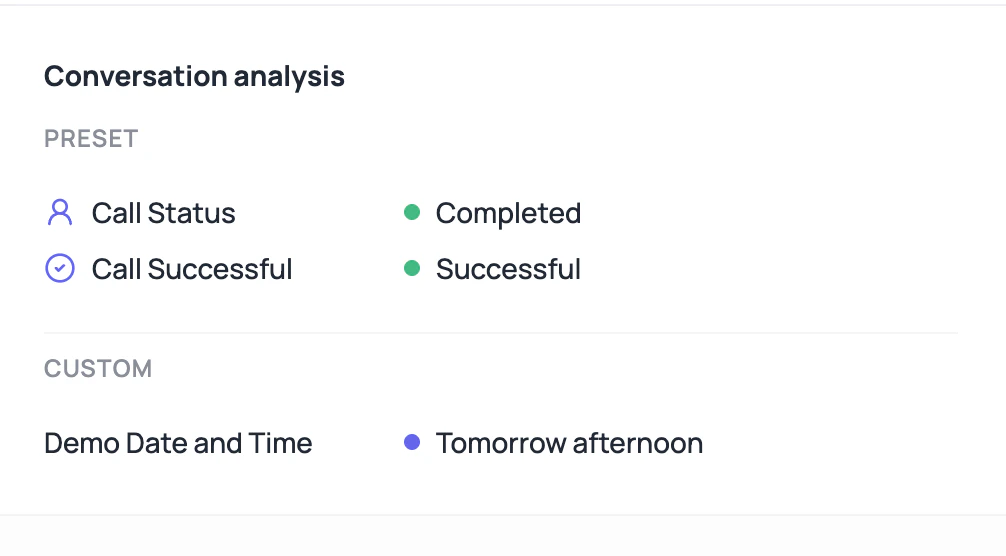
Post-call analysis is how a messy conversation becomes a usable row in a report.
DialNexa Post-Call Analysis Result Types
Field type controls how users should read the value.DateTime Display On Call Detail
DateTime fields are stored as ISO 8601 values with timezone information so automations and exports can process them consistently. On the call detail page, DialNexa can use the field type metadata to render DateTime values as a readable date and time with a calendar-style display. Custom post-call fields follow the configured field order when that metadata is available. If a DateTime value looks wrong, review the agent timezone, field description, transcript evidence, and raw exported value before changing the extractor.Where Result Quality Comes From
Bad extraction can be caused upstream.Field description
Clear field descriptions produce better extraction.
Transcript quality
If the transcript missed the fact, extraction may miss it too.
Prompt behavior
The agent must ask for the data you want extracted.
Export mapping
Exports carry extracted values into external reporting.
Why A Field Looks Wrong
The caller never answered
The caller never answered
The extractor cannot invent a value safely.
The field description was vague
The field description was vague
Rewrite the description around evidence and allowed output.
The call used an older version
The call used an older version
Check the version attached to the call before editing the current draft.
The value is excluded from custom section
The value is excluded from custom section
Some system fields such as sentiment are treated separately from custom extracted values.
The displayed DateTime does not match the export
The displayed DateTime does not match the export
The call detail page formats recognized DateTime fields for reading, while exports and automations should keep the ISO 8601 value with timezone information.
Related Reading
Post-Call Analysis Setup
Define fields.
Exporting Call Data
Use fields in CSVs.
Call Data Model
Understand stored output.