

DialNexa KYC And Outbound Readiness Checks
KYC state appears where outbound activity could create risk or spend.Complete KYC Verification
1
Open Phone Numbers
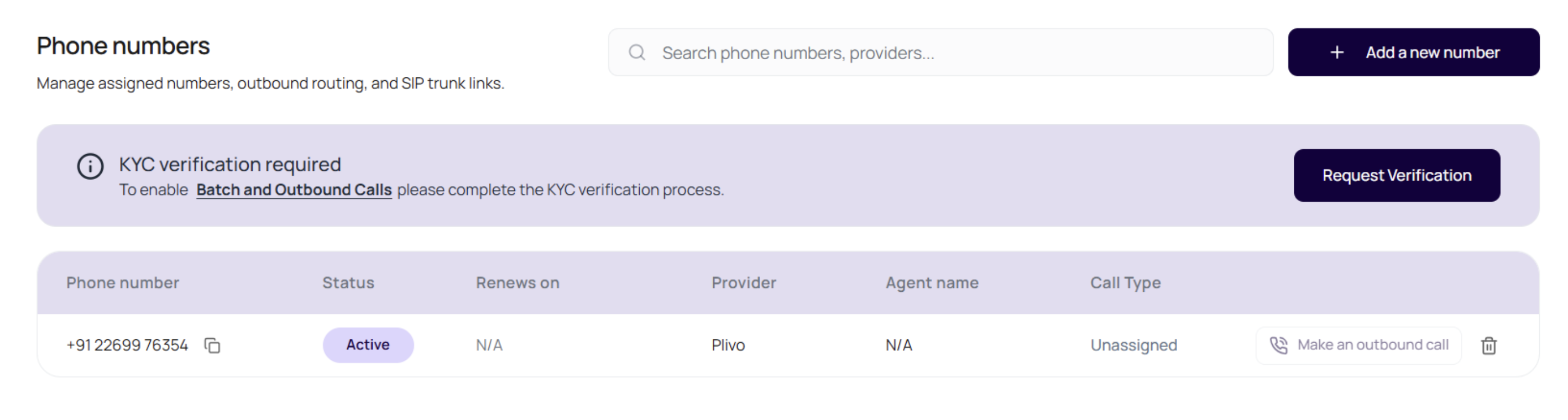
Go to Phone Numbers and use the KYC banner action. Owners see Start Verification when KYC has not been requested and Resubmit Documents when a previous submission was rejected.
2
Enter the company legal name
Use the legal company name that matches the documents you are uploading.
3
Upload registration proof
Upload the registration certificate, such as COI or Udyam, as a PDF, PNG, or JPG file up to 5 MB.
4
Upload tax proof
Upload the tax proof requested in the form, such as GST certificate or Business PAN, as a PDF, PNG, or JPG file up to 5 MB.
5
Accept the terms and submit
Read the Terms & Compliance Requirements block, accept the checkbox, and submit. After submission, the status moves to pending review. DialNexa emails the owner when review is approved or rejected.
Terms And Compliance Requirements
The KYC modal includes a scrollable Terms & Compliance Requirements block before submission. The owner must confirm that they have read and agree to those requirements before the request can be submitted. The block explains that the workspace must follow applicable telecom rules, including TRAI and DoT requirements where relevant. It also reminds the owner that outbound calling must be lawful, recipient consent must be handled where required, opt-out requests must be honored, and misuse or non-compliance can lead to suspension or termination of telephony services.Use Existing Compliance
If the owner already has a verified compliance on another workspace, the KYC modal can show an option to use that existing compliance. Select that option, enter the company legal name, accept the terms, and submit the request. This does not instantly verify the current workspace. It creates a pending request so the DialNexa team can manually attach the existing verified compliance.Resubmit After Rejection
When KYC is rejected, the Phone Numbers page shows the rejection reason where available. Use Resubmit Documents to upload corrected files. Resubmission creates a fresh review request and moves the workspace back to pending status.Outbound Behavior Before Verification
Unverified workspaces can still have limited testing behavior, but production outbound readiness is restricted.Phone Number Purchase Compliance
The Buy Phone Number modal can disable country choices when the workspace is not ready for that region. Hovering a disabled country explains the missing requirement, and the search button stays disabled until the selected country is purchase-ready. The modal also shows an inline warning for the selected country when search is blocked.
If a user cannot search for numbers, check the selected country first. A blocked US search usually means KYC is not complete. A blocked India search can mean KYC is incomplete, compliance documentation is missing, or both.
Prepare For Outbound Calls
1
Verify KYC first
Complete KYC before preparing production campaigns or buying new outbound numbers.
2
Assign an outbound agent
Open Phone Numbers and attach a published agent version to the outbound number.
3
Run a single test call
Use the phone number or agent test call before launching a batch.
4
Start with a small campaign
Upload a small CSV, confirm results in Call History, then scale.
Readiness Problems And Meaning
Batch Calls tab is disabled
Batch Calls tab is disabled
The workspace is not verified for Batch Calls yet. Complete KYC before retrying the campaign upload.
No outbound number appears
No outbound number appears
The workspace may not have an active number with an outbound agent assigned.
Campaign has no eligible route
Campaign has no eligible route
Check the outbound phone number and published agent version.
Recipient input is blocked
Recipient input is blocked
Check whether KYC is verified and whether the selected number is a non-SIP outbound number.
KYC review was rejected
KYC review was rejected
Read the rejection reason, correct the documents, and resubmit from the Phone Numbers page.
Related Reading
Phone Numbers
Assign outbound routing.
Outbound Calls
Place individual outbound calls.
Batch Calls Overview
Launch campaigns when ready.
KYC Video Tutorial
Watch the account verification walkthrough.