

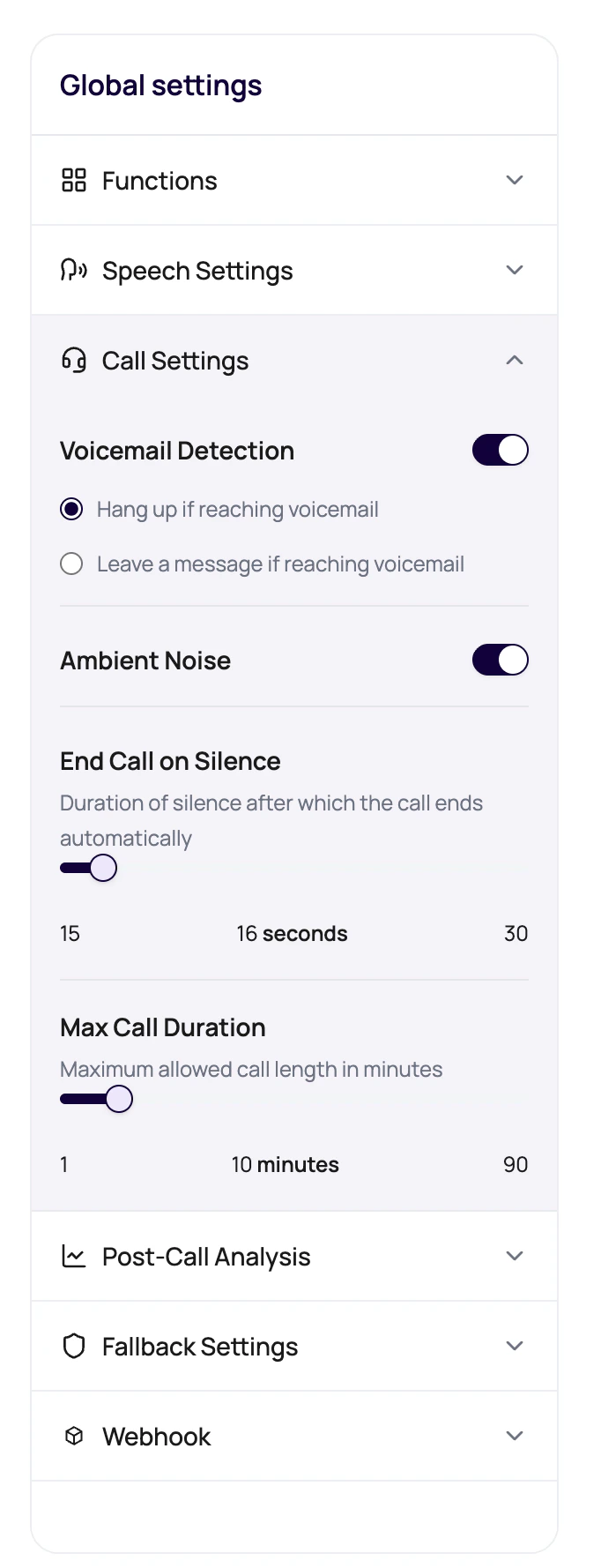
Before You Begin
Use a tested draft or published version and decide the acceptable call duration, silence behavior, voicemail outcome, and route-specific restrictions for the use case.Call Controls Users See
Call Limit Rules
The dashboard and API validate call limits before saving an agent version.Set Call Limits Intentionally
1
Decide voicemail behavior
For campaigns, choose whether voicemail should end the call or receive a short message.
2
Write a voicemail-safe message
Keep it short, include only safe dynamic variables, and test how the selected voice reads it.
3
Keep silence humane
Use enough silence time for real callers to think, find information, or respond.
4
Set max duration by use case
A reminder call and a support intake call should not have the same limit by accident.
5
Test edge cases
Let the test caller go quiet, hit voicemail, and talk longer than expected.
Call Settings And Voice AI Providers
Call Setting Failure Modes
Voicemail message has missing variables
Voicemail message has missing variables
Add defaults for any
{{variable}} used in the voicemail message.Silence timeout fires too soon
Silence timeout fires too soon
Increase the timeout or adjust reminder timing. People pause, look up details, and ask someone nearby.
Long calls cost more than expected
Long calls cost more than expected
Review maximum duration, transfer handling, campaign retry settings, and whether the prompt ends calls clearly.
Controls are disabled
Controls are disabled
You may be viewing a published version. Create or select an editable draft for changes.
Verify Call Settings
Test silence, maximum duration, voicemail, and any ambient sound or route behavior you changed. Confirm the caller experience and final Call History status match the configured rule.Related Reading
Voicemail Detection
Understand voicemail behavior.
Speech Settings
Tune Response Eagerness and Denoising Mode.
Phone Numbers
Understand route assignments.
Billing And Wallet
Plan for call duration.
Call Settings And Webhooks Video
Watch the call behavior and webhook setup walkthrough.