

DialNexa Speech Settings Controls
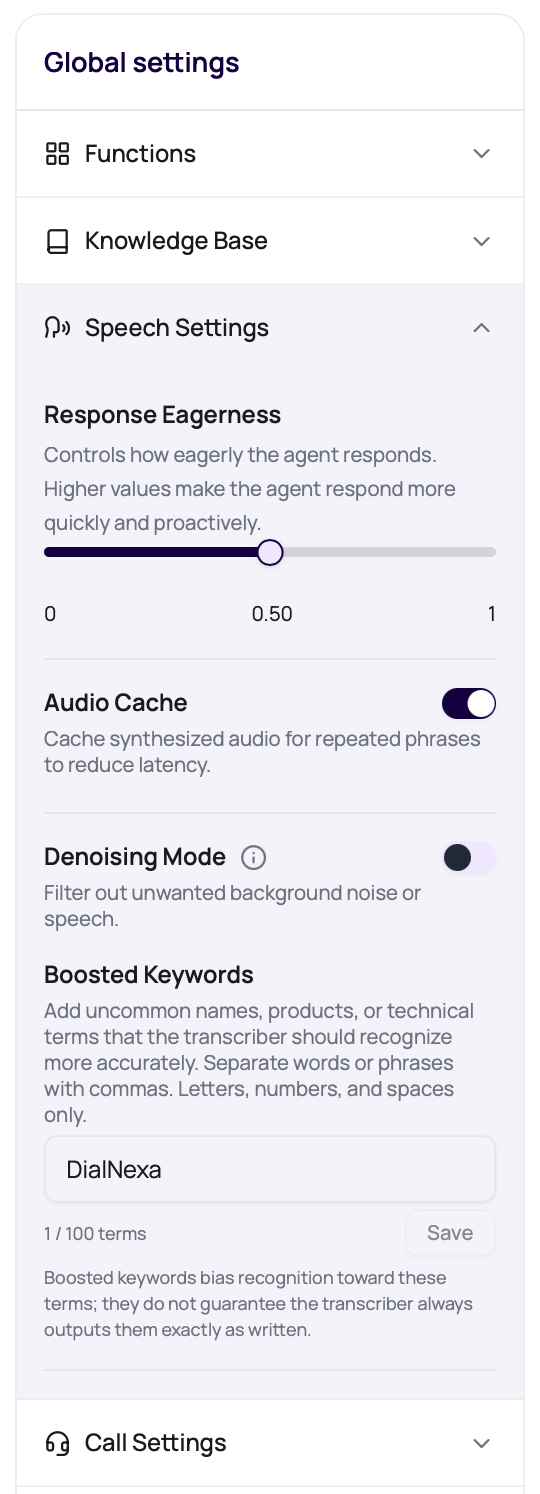
Response Eagerness
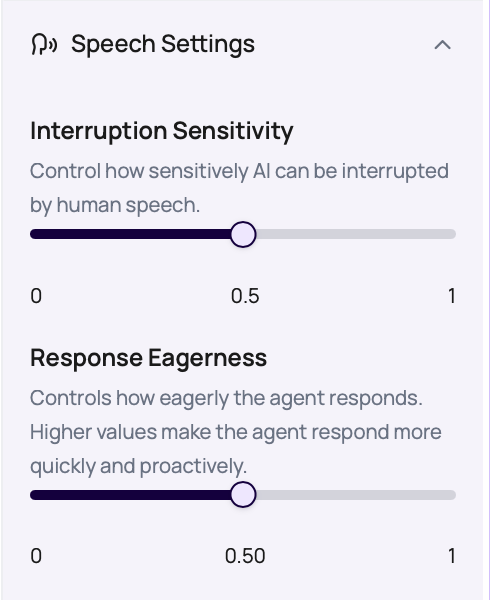
Response Eagerness runs from patient to eager. It is not a quality slider. It is a timing choice.Interruption Sensitivity
Interruption Sensitivity runs from0 to 1. Higher values make the agent more sensitive to caller speech while the agent is speaking. Lower values make interruption detection more conservative.
Boosted Keywords
Boosted Keywords lets you bias supported transcribers toward uncommon words that matter to the call, such as product names, locality names, medical terms, plan names, abbreviations, or internal brand terms. It appears for cascaded agents when the selected transcriber is Deepgram or Soniox. It is hidden for Speech to Speech agents and for transcribers that do not support recognition-bias vocabulary. Enter terms as a comma-separated list. DialNexa trims whitespace, removes empty entries, and de-duplicates terms case-insensitively while keeping the first spelling you entered.
Use Boosted Keywords for terms the caller may say, not for whole prompt instructions. The setting can improve recognition, but it does not guarantee the transcript will always output the term exactly as written. Verify it with recordings and transcripts before using it in a large batch.
Audio Cache
Audio Cache helps repeated text-to-speech output start faster. DialNexa tracks cache lookups, hits, misses, and new cache entries in call evidence when data is available.Denoising Mode
Denoising Mode can help with background noise, but it should be tested with the actual phone path. When Denoising Mode is on, the Noise Suppression Strength slider lets you choose how strongly DialNexa asks the denoiser to reduce background sound. Lower settings preserve more caller detail. Higher settings can suppress more noise, but aggressive cleanup can also damage speech details.Current outbound call processing keeps server-side denoising off unless DialNexa enables it for the route. Use recordings and transcripts to confirm whether a specific call path is receiving noise cleanup.
1
Listen to the bad call
Open Call History, play the recording, and identify noise, echo, clipping, silence, or distance from microphone.
2
Change only denoising
Keep transcriber, voice, prompt, and phone route the same for the next test. If Denoising Mode is already on, adjust Noise Suppression Strength one step at a time.
3
Retest the same call pattern
Use the same caller, route, and script if possible.
4
Compare transcript and recording
Keep denoising only if it improves recognition without making speech sound unnatural.
Hinglish Map
Hinglish Map appears for Hindi-English setup. Use it when the agent uses formal Hindi words that callers would not use in a real conversation.Troubleshoot By Symptom
Agent replies before the caller finishes
Agent replies before the caller finishes
Use a more patient Response Eagerness setting where available, shorten the welcome message, and inspect live transcript boundaries.
Repeated lines are still slow
Repeated lines are still slow
Check whether the text repeats exactly. Names, amounts, dates, and model rewording create new phrases.
Noisy calls produce bad transcripts
Noisy calls produce bad transcripts
Compare recording and transcript, try Denoising Mode, then compare transcribers through the same route.
Boosted Keywords will not save
Boosted Keywords will not save
Check term length, total length, punctuation, unsupported characters, and whether the selected transcriber is Deepgram or Soniox.
Hindi-English sounds too formal
Hindi-English sounds too formal
Use Hinglish Map, add prompt examples, and test the selected voice on mixed-language phrases.
Related Reading
Speech To Text
Understand transcribers and transcript evidence.
Text To Speech
Tune voices and Audio Cache.
Latency And Turn Taking
Diagnose response timing.
Audio Cache Monitoring
Read cache metrics after calls.
Speech Settings Video
Watch the speech settings walkthrough.