

Before You Begin
Connect and validate the provider, identify every required action field, prepare workflow fallback variables, and decide what the failure output should do.Application Node Fields
These are the stored configuration keys - what the API returns for the node. In the builder you do not type them; they are filled in automatically when you pick the integration, action, and template from the node’s dropdowns.
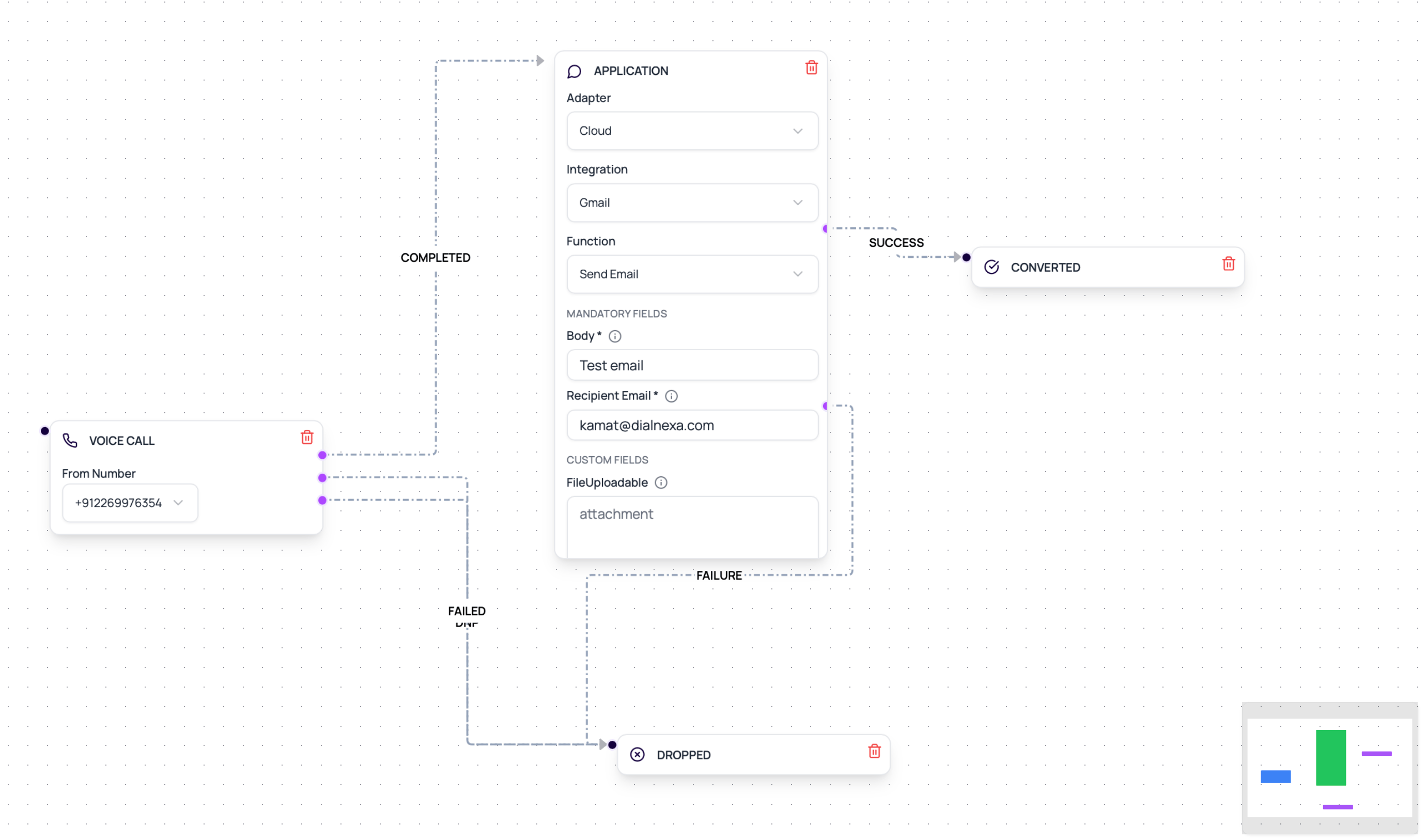
The workflow editor now shows Application nodes in the node palette for all organizations. In cloud mode, the node loads connected integrations, then loads the provider’s workflow-safe functions. For text-like fields, use the variable picker to insert lead variables, post-call analysis fields from the workflow’s call agent, and runtime call attributes.
Variable Sources
Use the picker rather than typing placeholders from memory when possible.Common Application Actions
Use actions that fit the workflow moment.Wati template
Send a WhatsApp template with named parameters and broadcast name.
Wati session message
Send a WhatsApp session message where the provider supports it.
Resend email
Send email with from address, recipient, subject, and text body.
Catalog action
Run an available integration action through its configured connection.
Prepare An Application Node
1
Connect the integration
Set credentials or hosted connection before using the action.
2
Choose the adapter mode
Use Cloud for connected integration functions. Use Native only for native actions enabled in your workspace.
3
Validate the connection
Use validation so obvious credential issues surface early.
4
Map variables
Use the variable picker for lead variables, post-call analysis fields, and runtime call attributes.
5
Wire success and failure
Connect both success and failure outputs. Generic integration nodes require both paths before execution.
6
Review invocation evidence
Use lead history and integration results when troubleshooting.
Billing For Cloud Integration Actions
Composio-backed Application node executions are counted for billing whether the provider action succeeds or fails, because DialNexa still sends an integration execution request. Billing is batched in groups of100 executions at approximately INR 1.79 per batch. The wallet deduction is recorded after a batch is reached and does not block workflow execution.
Review wallet transactions and integration invocation evidence together when reconciling workflow automation costs.
Verify The Application Node
Run one test lead through both a successful action and a controlled failure. Confirm the workflow route, redacted request and response, provider message or record id, missing fields, and latency.Related Reading
Using Integrations In Workflows
Connect workflow actions.
Lead Variables
Map data into templates.
Integration Functions
Understand action catalog behavior.
Voice AI Provider Selection
Choose the call stack before automating the follow-up path.