Latency and turn taking decide whether a DialNexa Voice AI call feels natural. A good agent hears enough caller speech, replies quickly enough, avoids talking over people, and recovers when callers interrupt.
A half-second pause can feel polite. A five-second pause feels like the call fell into a spreadsheet.

The Live Call Timing Chain

Every response passes through a chain. The slowest link becomes the caller’s experience.
StageWhat happensCommon delay source
Caller audioPhone, SIP, or web audio reaches DialNexa.Poor network, low-volume caller, noisy room, or telephony bridge.
Speech to textDeepgram or Soniox converts audio into text.Endpointing, language fit, noise, and interruption handling.
LLM reasoningOpenAI, Google, or Groq produces the next reply or action.Long prompt, slow model, function call, or fallback delay.
Text to speechElevenLabs or Cartesia turns text into audio.Voice model latency, long responses, cache miss.
PlaybackAudio streams back to the caller.Phone path, bridge delay, interruption handling.

Provider Choices That Affect Timing

Provider or featureTiming effectUse when
Deepgram Flux (English only)Fast English turn lifecycle signals. Good baseline for most English deployments.English calls are your primary use case.
Soniox STT RT v4Response Eagerness can tune how quickly the agent replies.Hinglish or Hindi-English calls need a patient but responsive listener.
Groq fallback LLMCan reduce response delay when the primary model is slow.You have measured LLM latency as the issue.
Audio CacheReduces repeated text-to-speech startup time.The agent repeats exact phrases across calls.
Custom functionsCan pause the conversation while waiting for your API.Only when the action is necessary before the agent can continue.

Settings That Change Timing Directly

SettingWhere it livesPractical note
Response EagernessSpeech Settings for Soniox.Moves the agent between patient and eager turn handling.
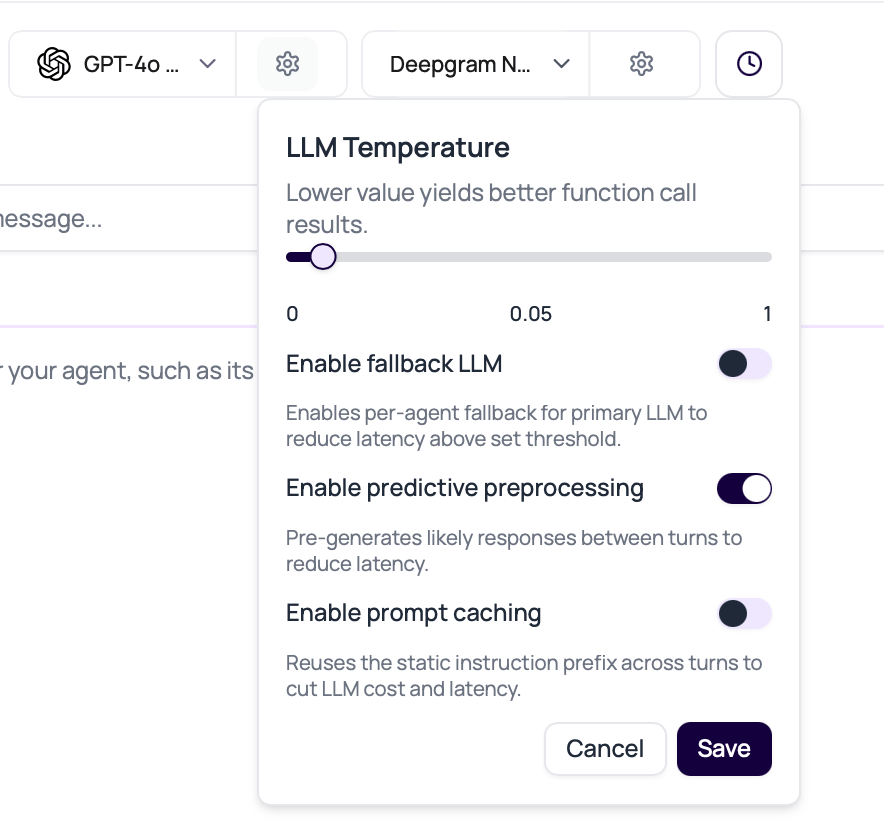
Fallback LLM delayModel settings popover.Defaults to 500 ms when no saved value exists.
Predictive preprocessingModel settings for non-flow agents.Pre-generates likely responses between turns when the next line is predictable.
Audio CacheSpeech Settings.Helps only when text and voice configuration repeat.
End call on silenceCall Settings.Prevents endless silence, but an aggressive value can end calls while callers are thinking.
DialNexa model settings popover showing LLM temperature, fallback LLM, fallback delay, and predictive preprocessing.

Diagnose Timing Problems

SymptomFirst places to inspect
Agent answers too earlyResponse Eagerness, transcript boundary, caller pause length, welcome message length.
Agent talks over callerTranscriber choice, interruption behavior, audio overlap, prompt style.
Agent waits too longLLM latency, custom function latency, voice synthesis, cache misses, endpointing.
Call ends while caller is thinkingSilence timeout, reminder interval, prompt pacing, caller environment.
First sentence is fast but later replies are slowLLM or function latency, not the welcome message.
Repeated phrases are slowAudio Cache disabled, phrase variation, or voice model delay.

A Practical Tuning Order

1

Listen before editing

Start with the recording. Transcript text alone cannot show silence, overlap, breathing room, or whether the caller was interrupted.
2

Check transcript boundaries

See whether the caller’s final words appear before the agent responds. If not, tune transcription and response timing first.
3

Shorten the agent response

Long welcomes and long answers increase the chance of overlap. A concise line often beats a philosophical paragraph.
4

Tune one technical setting

Adjust Response Eagerness, transcriber, fallback LLM, Audio Cache, or silence timeout one at a time.
5

Retest with deliberate interruptions

Ask the test caller to interrupt, correct themselves, pause, and answer with short phrases.

Common Timing Traps

If the agent is waiting for an API response, voice speed will not fix it. Check function latency and timeout behavior.
A very low fallback delay can race models unnecessarily. Start with a measured delay and inspect which model wins.
People think, search, ask someone nearby, or look up details. Give them enough space.
A quick wrong answer is still wrong. Balance response speed with transcript quality and instruction following.

Speech Settings

Tune Response Eagerness, Audio Cache, and Denoising Mode.

Speech To Text

Compare transcriber timing behavior.

LLMs And Conversation Behavior

Understand fallback LLMs and model latency.

Call Detail Page

Review evidence after a call.